Solution Build解決方案建構(Solution Build)
Build solutions clients trust. Map insights into a scalable architecture across workspaces, teamspaces, pages, and databases, apply Notion's principles of Transparency, Simplicity, and Governance, and use the Discover-Design-Validate-Deploy-Evolve flow to deliver a use case with clear outcomes.建立客戶信賴的解決方案。將洞察轉化為跨 Workspace、Teamspace、Page 與 Database 的可擴展架構,運用 Notion 的透明性、簡潔性和治理三大原則,透過探索-設計-驗證-部署-演進流程交付具備明確成果的使用案例。
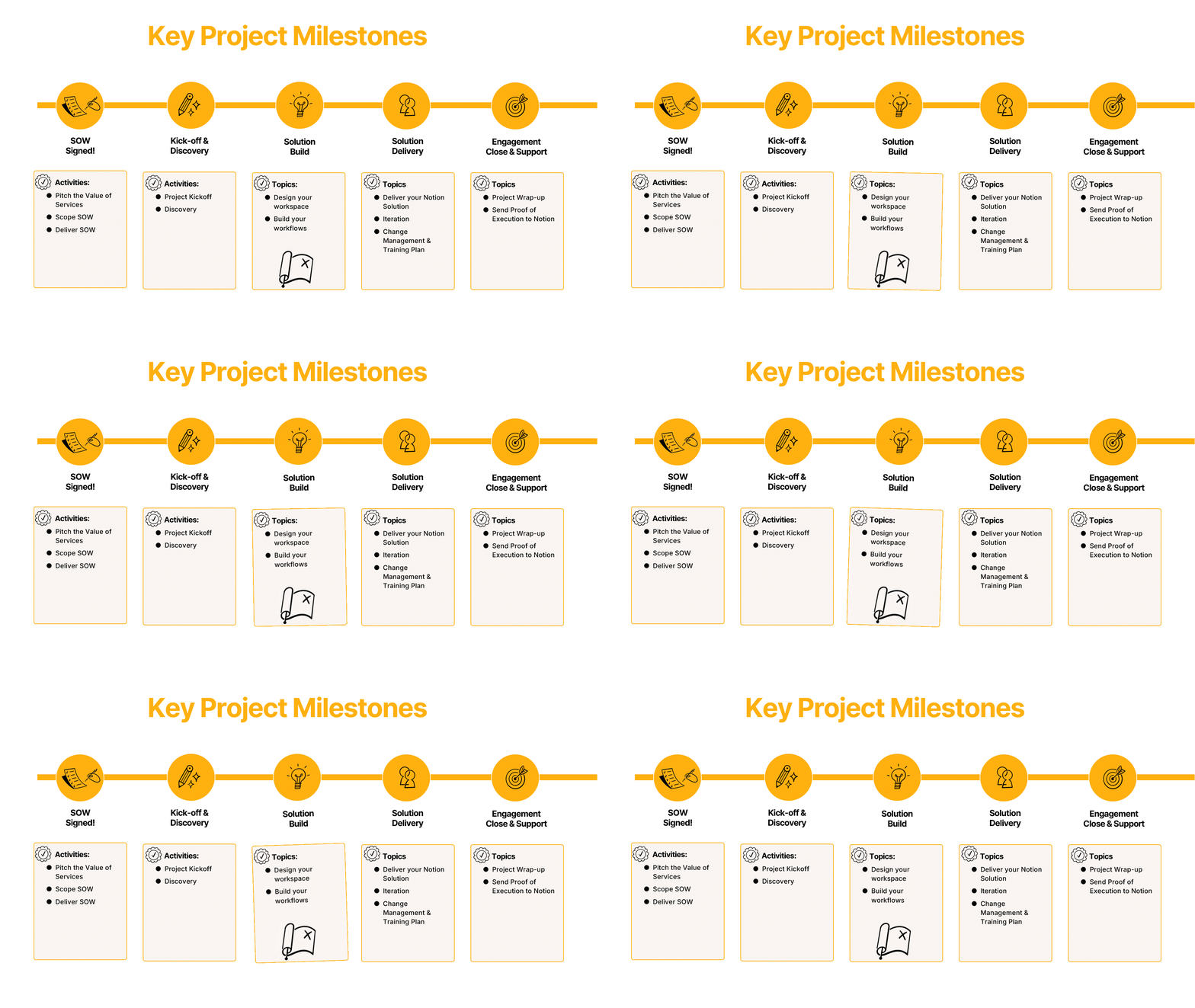
The key project milestones: SOW Signed, Kick-Off and Discovery, Solution Build, Solution Deliver, and Engagement Close.關鍵專案里程碑:SOW 簽署、啟動與探索、解決方案建構、解決方案交付、專案收尾。
After this lesson, you will be able to...完成本單元後,你將能夠...
1. Lesson Overview1. 課程概覽
Where are we in the project journey?我們在專案旅程中的哪個階段?
Now that you have kicked off your project and done discovery, you are ready to start building your Notion solution for your customer. The Solution Build & Delivery milestone is where execution happens.在完成專案啟動與探索之後,你已準備好為客戶開始建置 Notion 解決方案。解決方案建構與交付里程碑正是執行的關鍵階段。
You'll turn discovery into action by building the workspace around real use cases, setting roles and permissions, testing with sample data, and iterating on feedback. The outcome: a confirmed build, training materials, and a launch-ready checklist.你將把探索轉化為行動:圍繞真實使用案例建置 Workspace、設定角色與權限、用範例資料測試、根據回饋迭代。最終成果:確認的建置方案、訓練教材,以及準備上線的檢查清單。
2. Introduction to Workspace Design2. Workspace 設計入門
Practical concepts and guiding principles for workspace design.Workspace 設計的實務概念與指導原則。
Workspace DesignWorkspace 設計
Notion lets you build beautiful tools for your life's work, but sometimes our customers aren't exactly sure how to begin building. Our main job as consultants is to design and build those tools for our customers to help facilitate and encourage collaboration on Notion, otherwise known as Workspace Design.Notion 讓你能為工作打造精美的工具,但客戶有時不確定從何開始。身為顧問,我們的主要任務是為客戶設計和建置這些工具,促進並鼓勵在 Notion 上的協作,這就是所謂的 Workspace 設計。
Workspace Design is a strategic framework for designing scalable, intuitive information architecture within Notion that aligns organizational structure with digital workflows. It goes beyond simple page organization to create interconnected ecosystems where teams can seamlessly find, share, and collaborate on information while maintaining appropriate governance and security controls.Workspace 設計是一套策略框架,用於在 Notion 中設計可擴展、直覺式的資訊架構,使組織結構與數位工作流程對齊。它超越了單純的頁面整理,打造出相互連結的生態系統,讓團隊能無縫地查找、分享和協作資訊,同時維護適當的治理與安全控制。
We want to ensure that at least 95% of what users need is discoverable within three main areas. This reduces cognitive load through consistent navigation patterns, and evolves with the organization's growth without requiring complete restructuring!我們要確保使用者至少 95% 的需求能在三個主要區域內找到。這透過一致的導航模式降低認知負擔,並隨著組織成長演進,無需完全重組架構!
Click the plus signs below to reveal customer questions that are solved throughout the Workspace Design process:點擊下方的加號展開 Workspace 設計過程中會解決的客戶常見問題:
What needs to be a top level page?什麼應該作為頂層頁面?
This is a common question from customers starting to organize their workspace. The Workspace Design process helps determine the right hierarchy of content based on how teams navigate and consume information.這是客戶開始整理 Workspace 時的常見問題。Workspace 設計流程會根據團隊如何導航和消費資訊,幫助決定合適的內容層級。
Centralised vs decentralised?集中式 vs 分散式?
Whether to centralize information in shared teamspaces or decentralize it across team-specific areas depends on the organization's structure, collaboration patterns, and governance requirements.要將資訊集中在共享 Teamspace,還是分散到各團隊專屬區域,取決於組織結構、協作模式和治理需求。
What needs to be private?哪些內容需要設為私密?
Determining what information requires restricted access is a key part of workspace design. This includes sensitive HR data, financial information, and strategic documents that should only be accessible to specific groups.決定哪些資訊需要限制存取是 Workspace 設計的關鍵部分。這包括敏感的人資數據、財務資訊,以及只有特定群組才能存取的策略文件。
Radically flat structure?極度扁平的結構?
Some organizations prefer a flat hierarchy where all content is equally accessible, while others need more structured layers. The right approach depends on team size, information volume, and usage patterns.有些組織偏好所有內容同等可及的扁平層級,而有些則需要更有結構的分層。正確的做法取決於團隊規模、資訊量和使用模式。
How many teamspaces do I need?我需要多少個 Teamspace?
The recommended starting point is 3 main teamspaces: a Home teamspace, an Operating System teamspace, and Functional/Team Area teamspaces. This keeps the structure manageable while covering most organizational needs.建議的起始點是 3 個主要 Teamspace:一個首頁 Teamspace、一個作業系統 Teamspace,和一個功能/團隊區域 Teamspace。這讓結構保持可管理性,同時涵蓋大多數組織需求。
Helpful Concepts for Workspace DesignWorkspace 設計的實用概念
The Knowledge Flywheel知識飛輪(Knowledge Flywheel)
The Knowledge Flywheel shows how Notion turns static knowledge repositories into active, living systems where knowledge creation, collaboration, and retrieval continuously reinforce each other. This is what makes Notion indispensable as teams' central knowledge hub.知識飛輪展示了 Notion 如何將靜態的知識庫轉變為活躍的系統,在其中知識的創建、協作和檢索持續相互強化。這正是 Notion 作為團隊核心知識中樞不可或缺的原因。
When designing a customer's Notion workspace, it's helpful to think of how users will interact with information in Notion in these 3 ways:在設計客戶的 Notion Workspace 時,思考使用者如何以這三種方式與資訊互動會很有幫助:
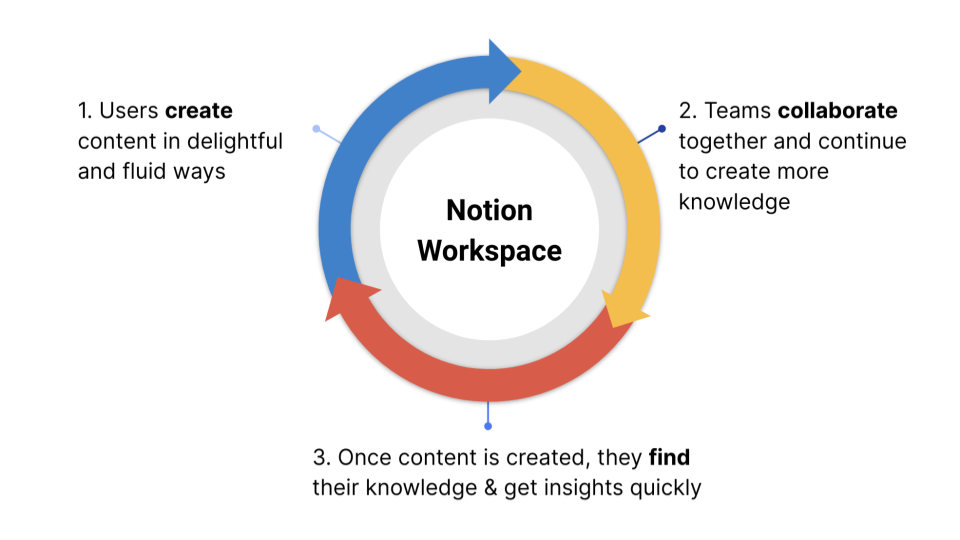
The Notion Knowledge Flywheel: Create → Collaborate → Find & InsightNotion 知識飛輪:創建 → 協作 → 查找與洞察
Align Company Structure & Objectives to Notion將公司結構與目標對齊到 Notion
Ensuring Notion aligns with a customer's org structure, mission, and objectives creates a centralized, scalable, and purpose-driven workspace that enhances efficiency, collaboration, and strategic execution.確保 Notion 與客戶的組織結構、使命和目標對齊,能打造出集中化、可擴展、以目的為導向的 Workspace,提升效率、協作和策略執行力。
It needs to be clear for the end users what they are coming to Notion for and why:必須讓終端使用者清楚知道他們為什麼要使用 Notion:
- Increase productivity提升生產力
- Drive efficiency驅動效率
- Consolidate software整合軟體工具

When the knowledge flywheel is properly aligned with company structure, it transforms Notion from a documentation tool into a strategic business asset that:當知識飛輪與公司結構正確對齊時,它將 Notion 從一個文件工具轉變為策略性的商業資產:
- Reduces information silos between departments減少部門之間的資訊孤島
- Accelerates decision-making by surfacing relevant context透過呈現相關上下文加速決策
- Scales institutional knowledge as the organization grows隨著組織成長擴展機構知識
- Enables AI to provide more relevant, contextual insights讓 AI 能提供更相關、更具上下文的洞察
The knowledge flywheel only creates lasting value when it's built on the foundation of how the organization actually operates, not how we think they should operate.知識飛輪只有建立在組織實際運作方式的基礎上,才能創造持久的價值——而非我們認為他們應該如何運作。
Workspace Design PrinciplesWorkspace 設計原則
When designing customer workspaces, keep these three principles in mind to help drive success and adoption on Notion.在設計客戶 Workspace 時,牢記這三個原則以推動 Notion 的成功採用。
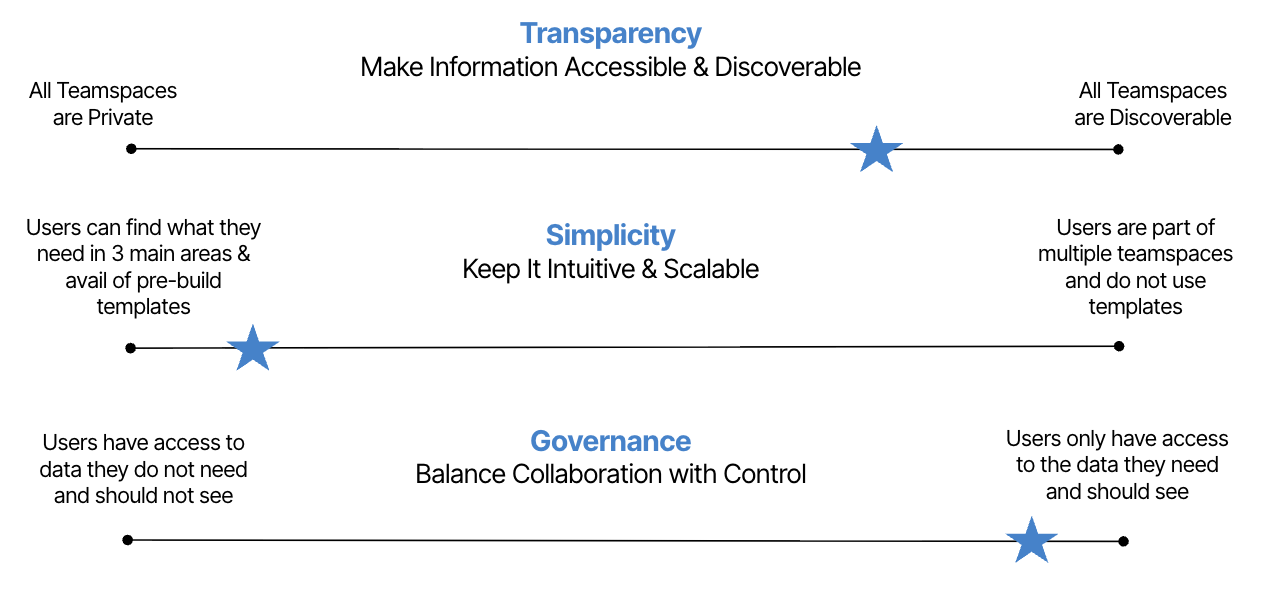
The three workspace design principles and where they fall on the scale.三大 Workspace 設計原則及其在光譜上的定位。
Transparency透明性(Transparency)
Make information effortless: when people can find what they need fast, work speeds up and rework drops. Organize clearly, add just enough context, and keep patterns consistent so need-to-know becomes easy-to-find.讓資訊取得毫不費力:當人們能快速找到所需,工作速度加快、重複作業減少。清楚組織、加入適量的上下文、保持模式一致,讓「需要知道的」變成「容易找到的」。
Below are a few examples of how this design principle appears in Workspace Design:以下是這個設計原則如何體現在 Workspace 設計中的幾個範例:
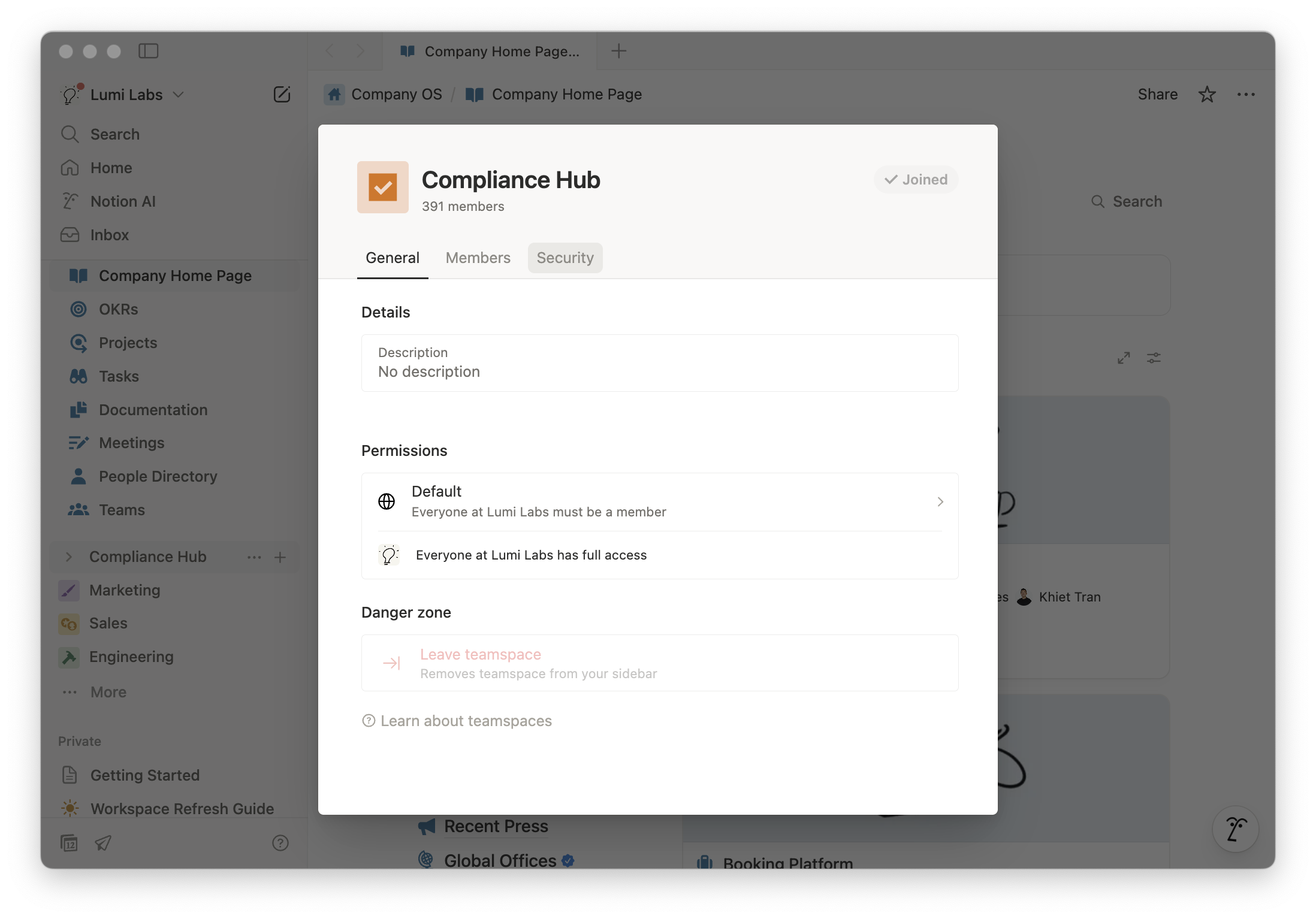
Teamspace access in Notion.Notion 中的 Teamspace 存取設定。
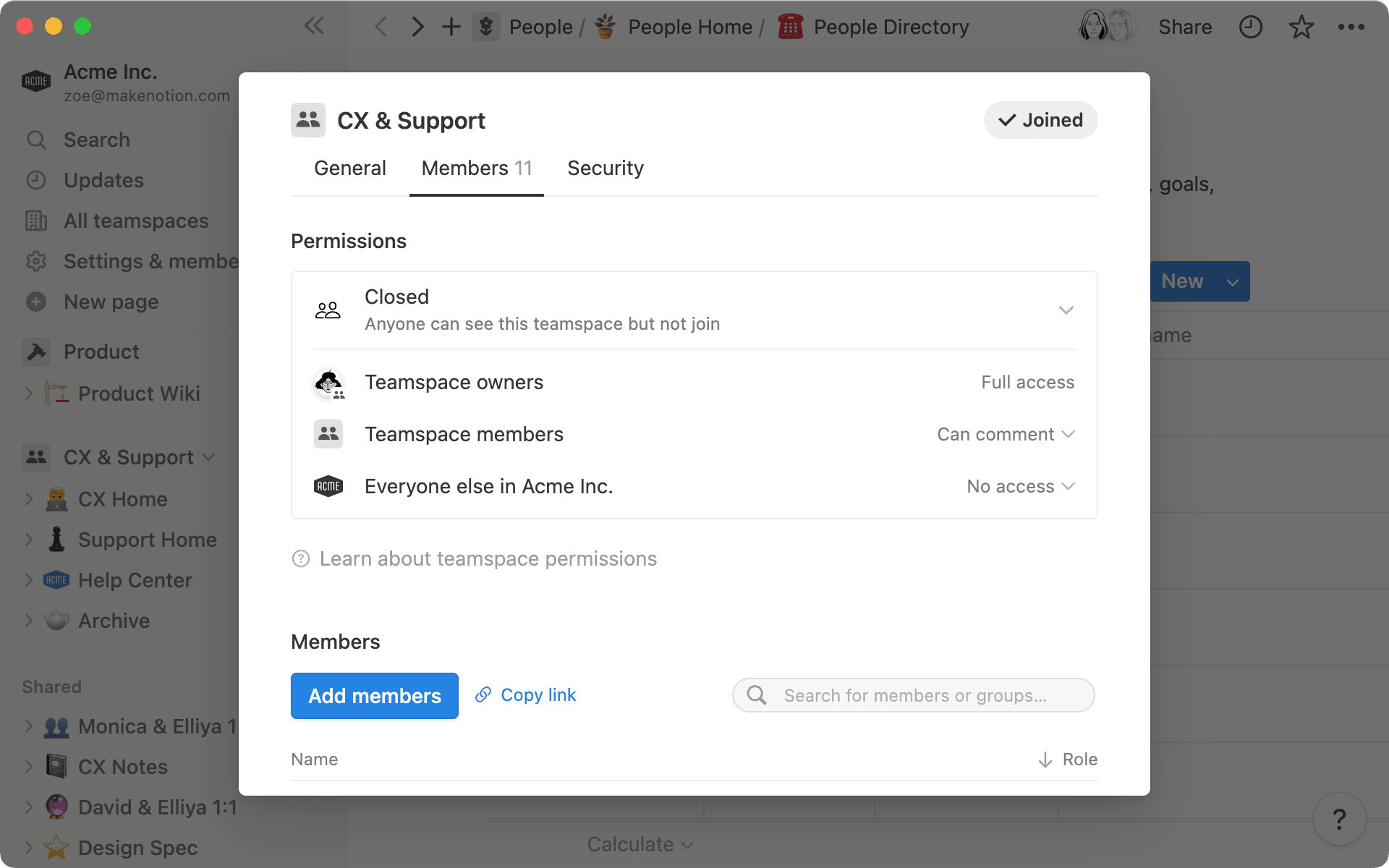
Teamspace settings in Notion.Notion 中的 Teamspace 設定。
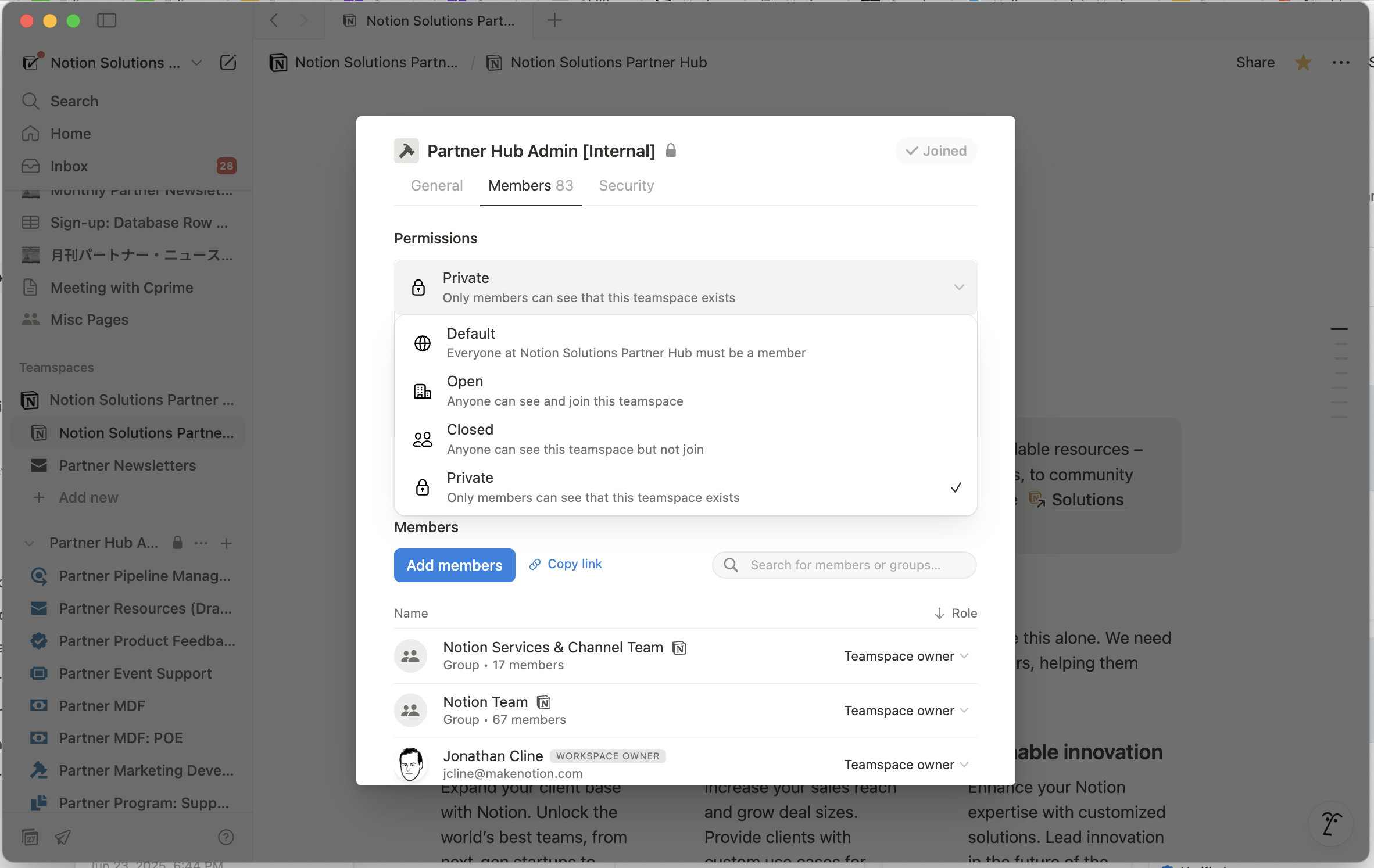
Group permission in Notion.Notion 中的群組權限設定。
Why is this important? Reduces information silos and ensures that knowledge is shared effectively across teams!為什麼重要?減少資訊孤島,確保知識在團隊間有效共享!
Tips to guide your design:設計指引提示:
- Clear Information Hierarchy: Structure workspaces so users know where to go for key information清晰的資訊層級:結構化 Workspace,讓使用者知道去哪裡找關鍵資訊
- Company-Wide Visibility: Default to open, shared teamspaces, except for sensitive data全公司可見性:預設為開放的共享 Teamspace,敏感資料除外
- Standardized Documentation Practices: Use consistent naming conventions, tags, and templates to ensure clarity標準化文件實務:使用一致的命名規則、標籤和 Template 確保清晰度
- Use Root Databases and link data for Context: Use relations & rollups to connect information across teams (e.g., projects linked to OKRs)使用根 Database(Root Database)並連結資料以提供上下文:使用 Relation 和 Rollup 連接跨團隊的資訊(例如專案連結到 OKR)
Simplicity簡潔性(Simplicity)
Keep it simple: reduce complexity wherever possible by keeping navigation and workflows easy to use and maintain.保持簡潔:盡可能降低複雜度,讓導航和工作流程容易使用與維護。
Below are a few examples of how this design principle appears in Workspace Design:以下是這個設計原則如何體現在 Workspace 設計中的幾個範例:
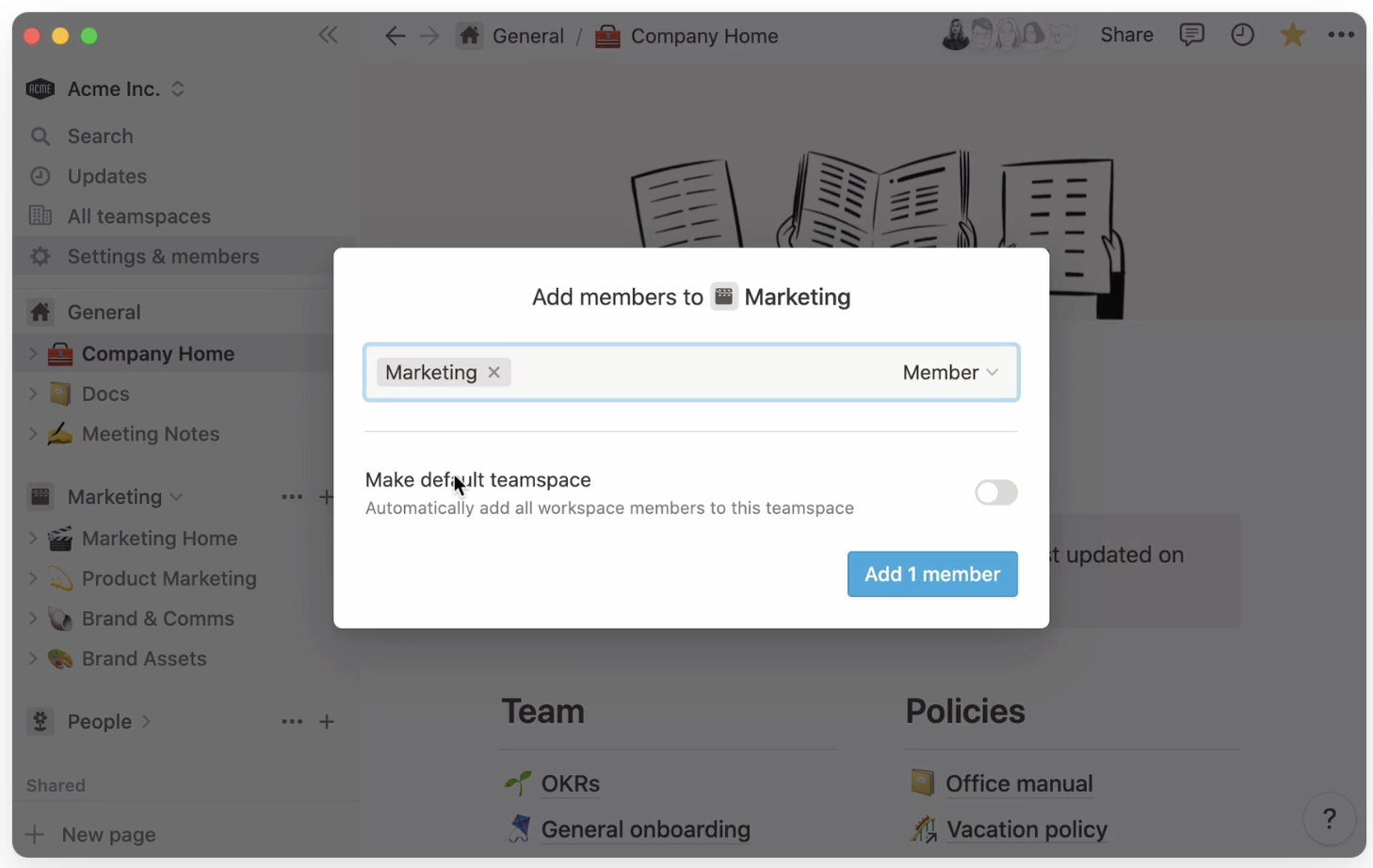
Default spaces in Notion.Notion 中的預設空間。
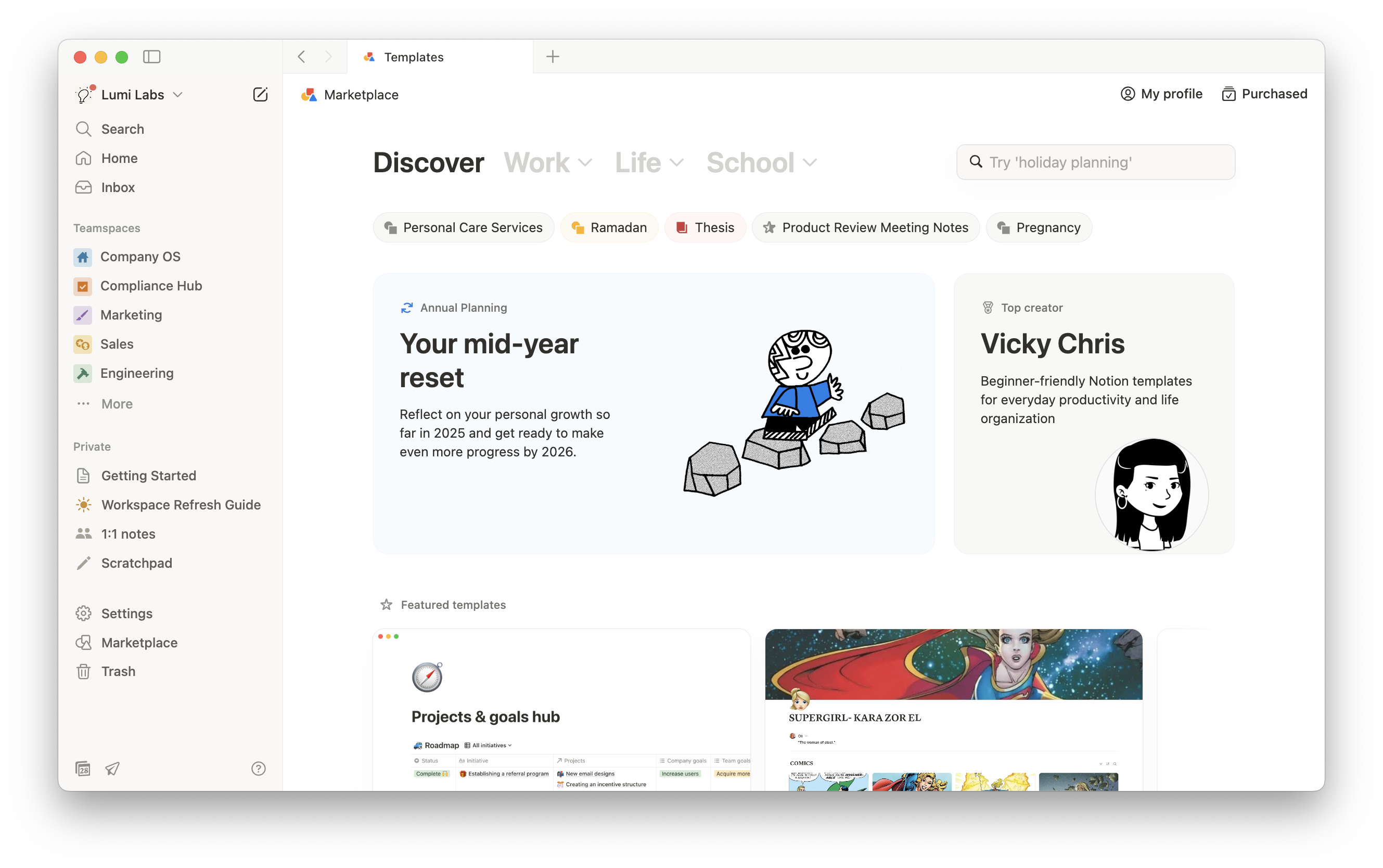
Templates in Notion.Notion 中的 Template。
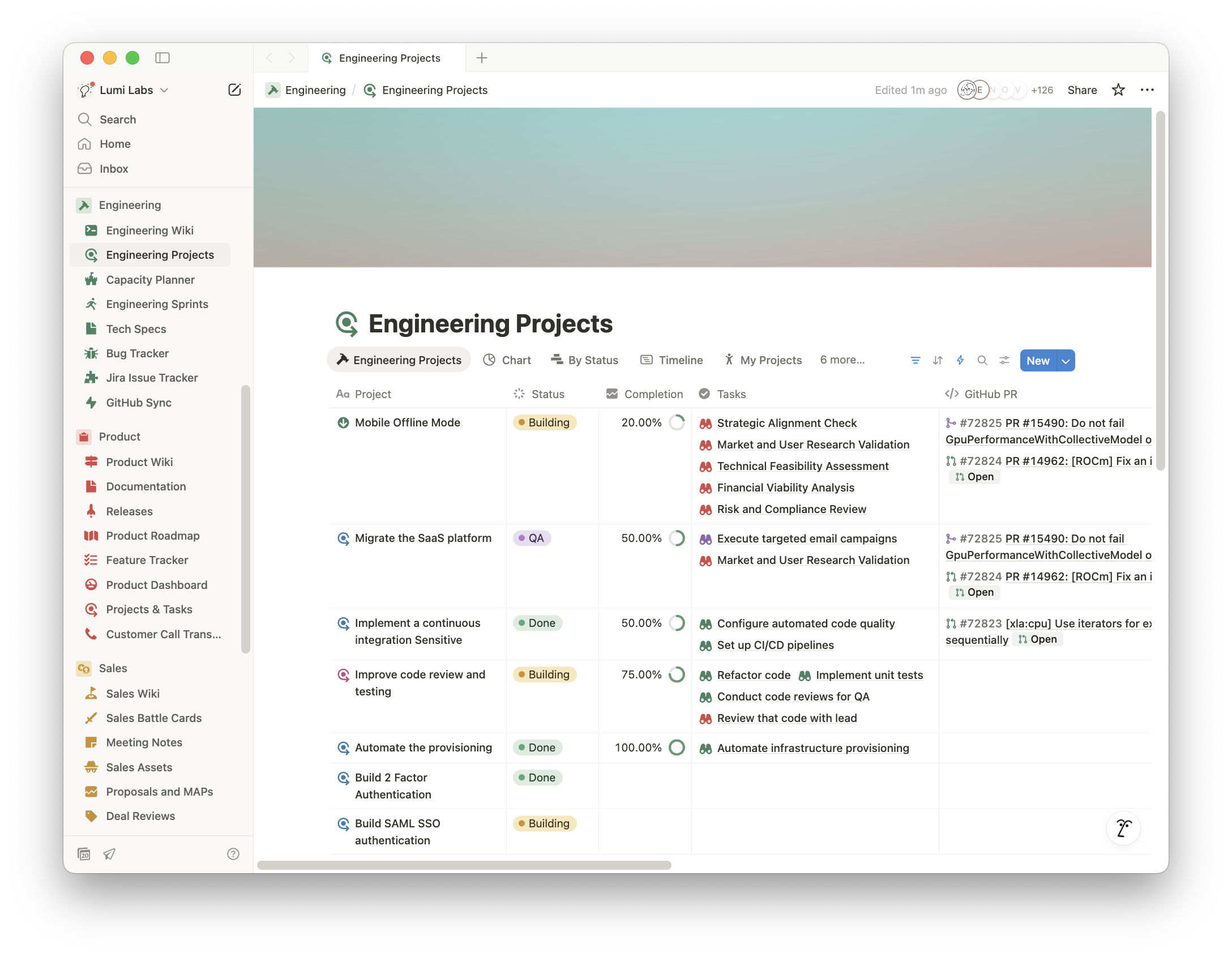
Database example in Notion.Notion 中的 Database 範例。
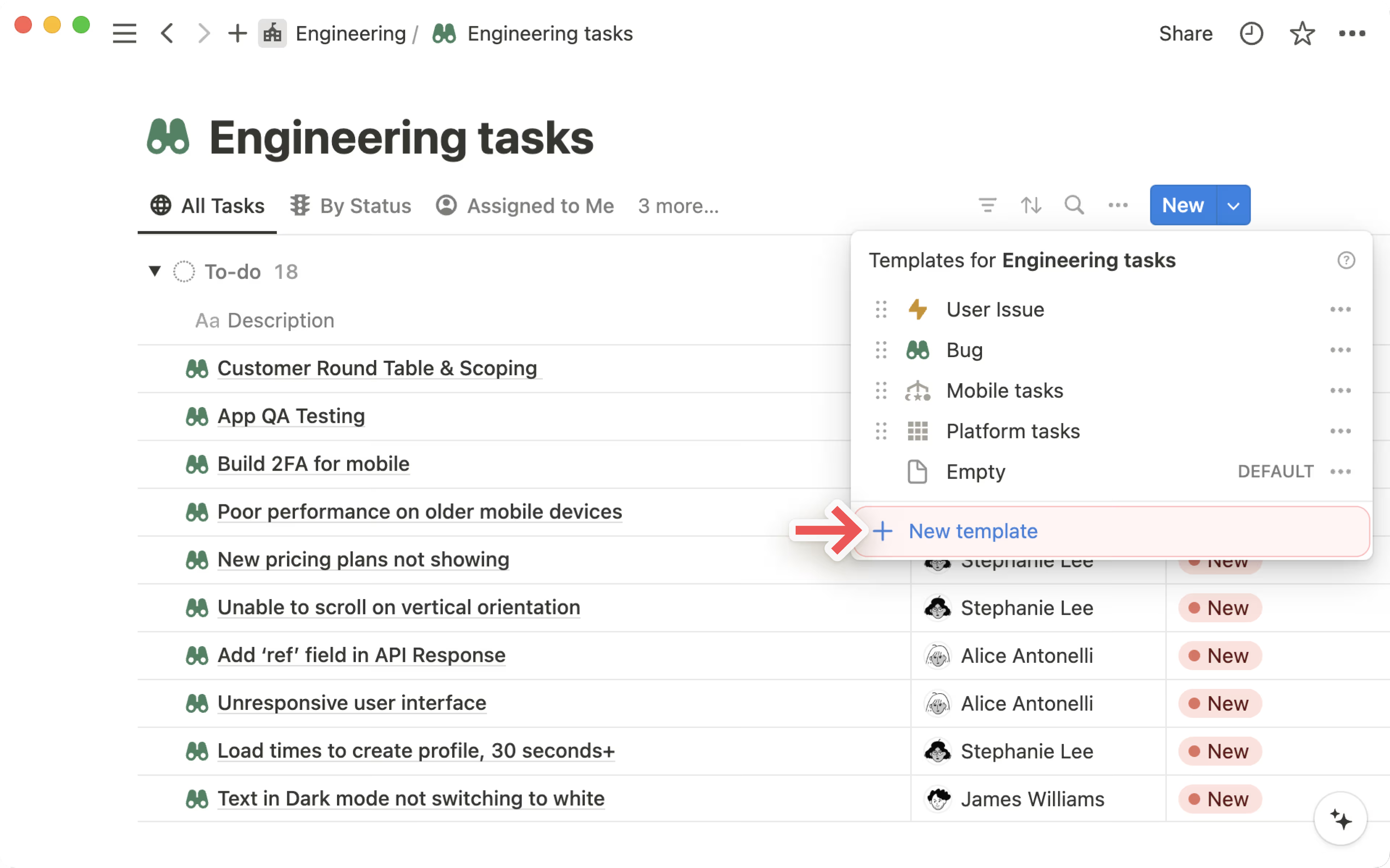
New Template option in databases in Notion.Notion Database 中的新增 Template 選項。
Why is this important? Improves usability, ensures scalability, and reduces friction in workspace adoption!為什麼重要?提升可用性、確保可擴展性,並降低 Workspace 採用的阻力!
Tips to guide your design:設計指引提示:
- Ease of Use: Users should find 95% of what they need in three key areas like a "Home" Teamspace for all employees or an "Operating Systems" for teams to document business processes易用性:使用者應能在三個關鍵區域找到 95% 的所需,例如全員使用的「首頁」Teamspace 或團隊記錄業務流程的「作業系統」
- Database-First Approach: Replace scattered static pages with dynamic databases for tracking tasks, projects, and knowledgeDatabase 優先策略:用動態 Database 取代散落的靜態頁面,追蹤任務、專案和知識
- Pre-Built Templates: Standardize common workflows (e.g., meeting notes, project tracking) to reduce setup time預建 Template:標準化常見工作流程(例如會議記錄、專案追蹤)以減少設定時間
- Limit Redundancy: Avoid duplicate pages or disconnected workspaces — use linked views and dashboards instead減少冗餘:避免重複頁面或斷開的 Workspace——改用 Linked View 和 Dashboard
Governance治理(Governance)
Give teams the access they need while protecting sensitive data and keeping the workspace clean and secure.在保護敏感資料和維持 Workspace 整潔安全的同時,給予團隊所需的存取權限。
Below are a few examples of how this design principle appears in Workspace Design:以下是這個設計原則如何體現在 Workspace 設計中的幾個範例:
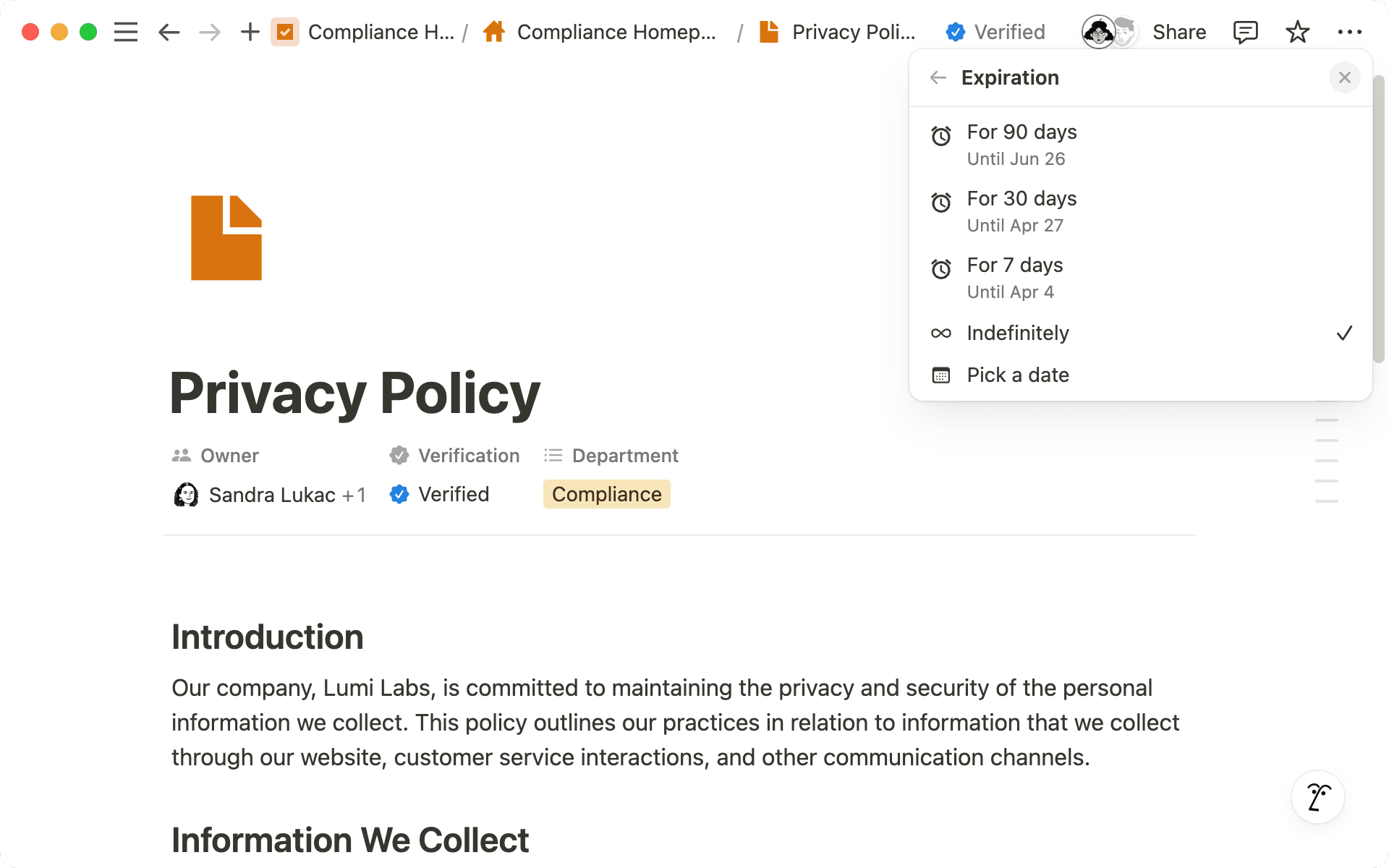
Content verification feature with indefinitely selected.內容驗證功能,已選擇「無限期」。
Organize the project catalog and categorize your work in folders. Use search and filters to easily find the courses you need.整理專案目錄並將工作分類到資料夾中。使用搜尋和篩選器輕鬆找到你需要的課程。
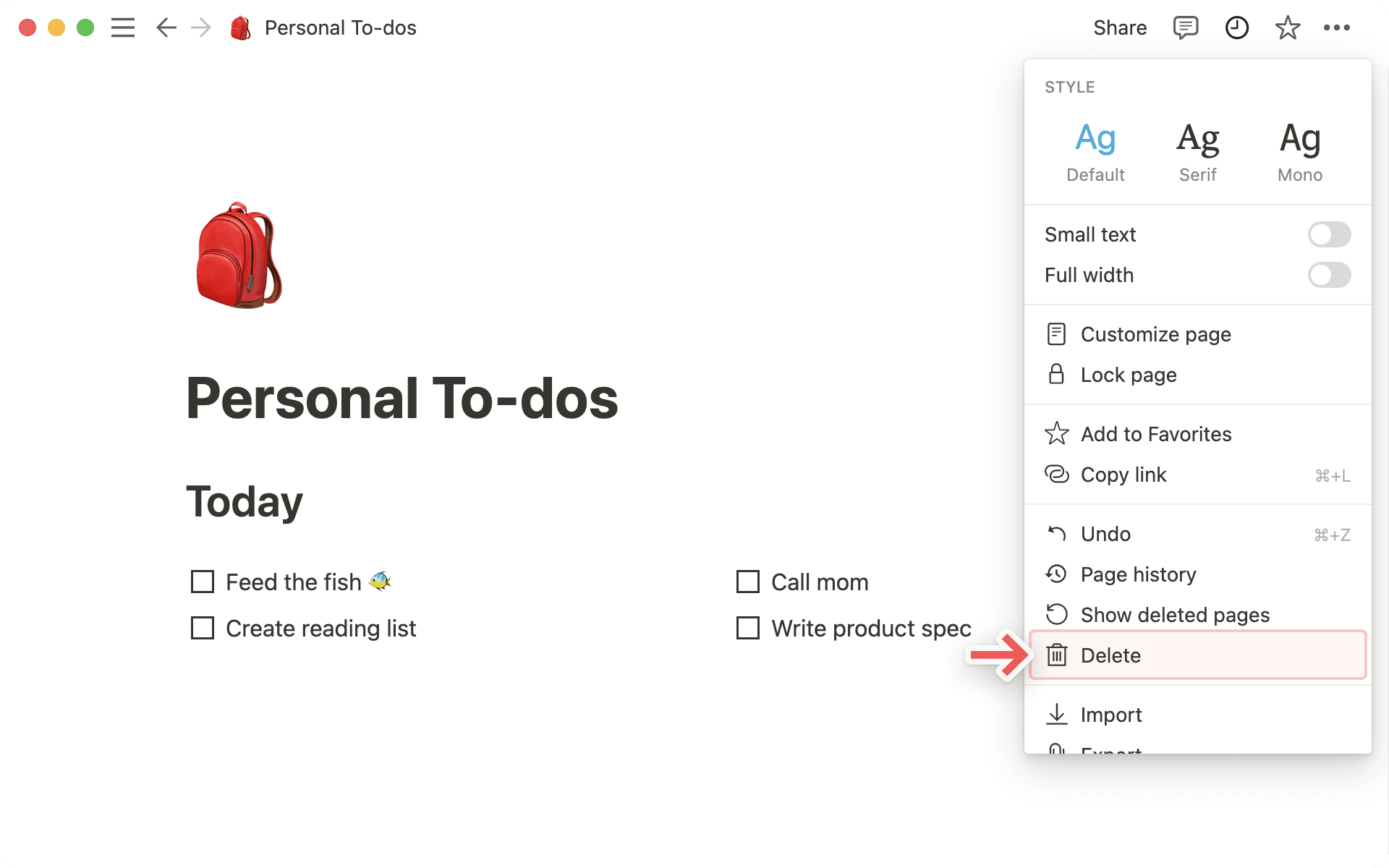
Delete option highlighted.刪除選項已標記。
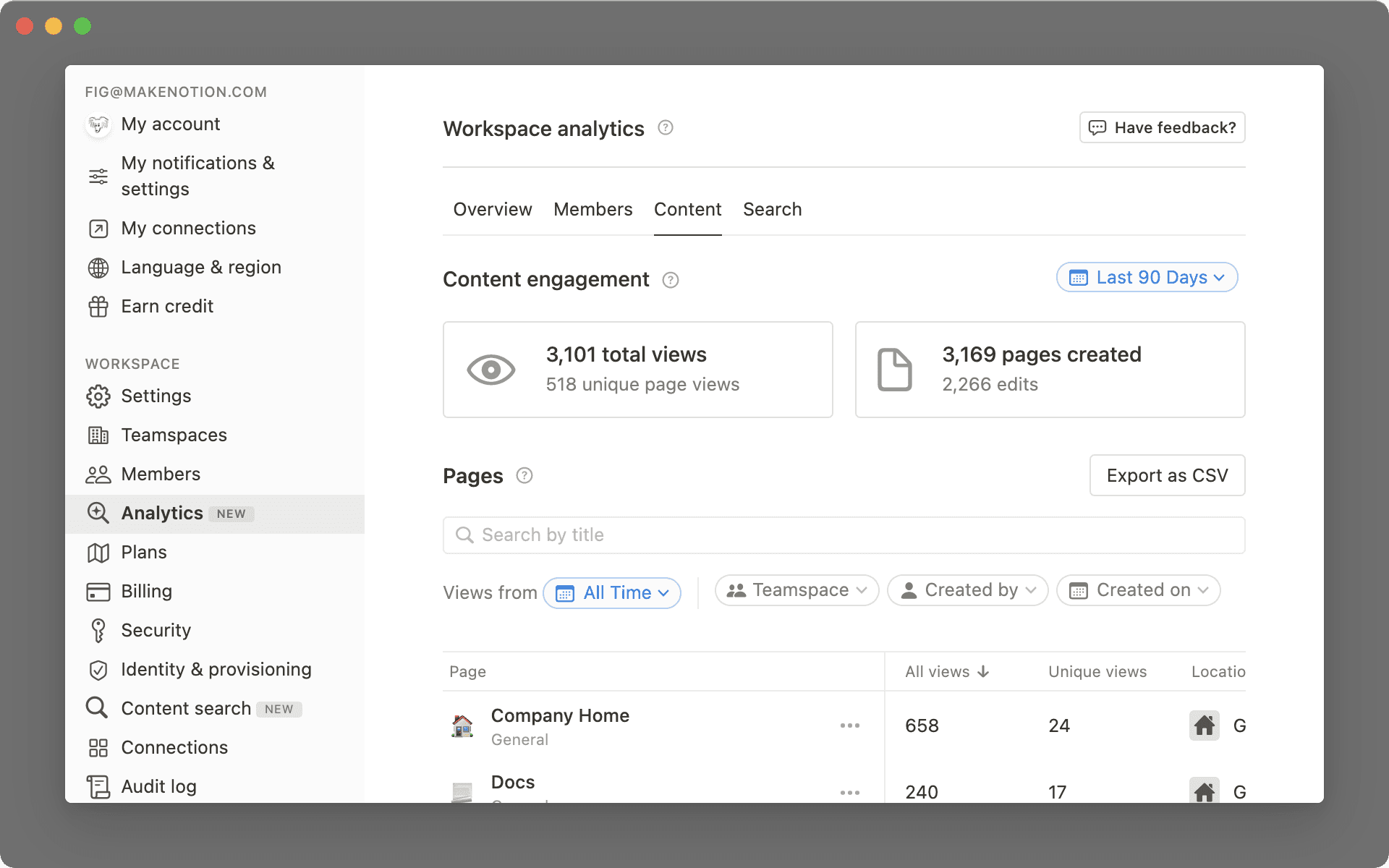
Example of workspace analytics.Workspace 分析範例。
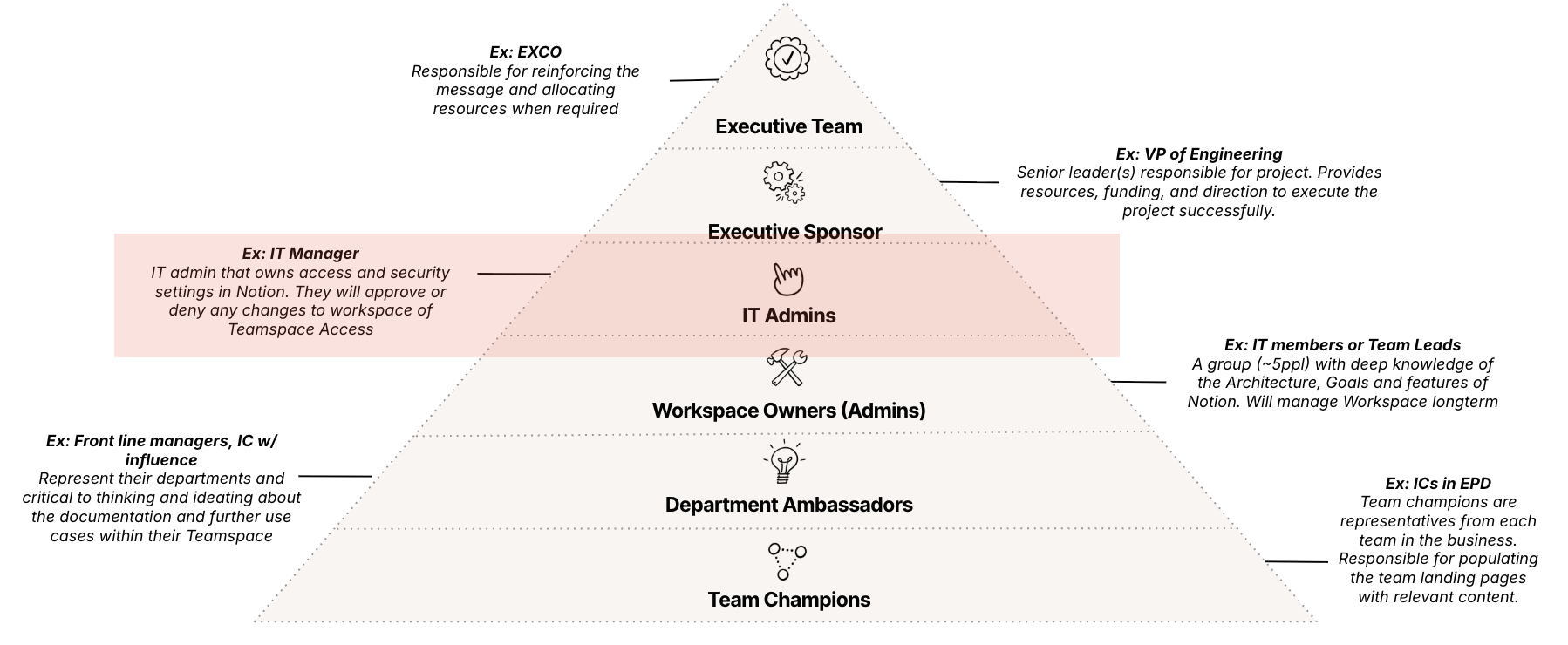
Stakeholder pyramid with IT Admins highlighted.利害關係人金字塔,IT 管理員已標記。
Outcome: A workspace with a clear governance structure, appropriate permissions, and defined roles to ensure the workspace is maintained and delivers value long term!成果:一個具有清晰治理結構、適當權限和明確角色的 Workspace,確保長期維護並持續創造價值!
3. Workspace Design Discovery3. Workspace 設計探索
Detailed inputs needed from your customer to influence your design.影響你設計的客戶詳細資訊需求。
Now that we know what Workspace Design is and the design principles used to build, let's spend some time diving into the detailed inputs needed from your customer to help influence your design.現在我們了解了什麼是 Workspace 設計以及用於建置的設計原則,讓我們深入探討需要從客戶那裡獲取的詳細資訊,以影響你的設計。
Discovery is critical: Everything in a healthy Notion workspace — architecture, navigation, permissions, database relationships — comes from what you learn upfront. Skip or rush discovery and you're not "saving time," you're just pre-paying for rework. Do it well and the workspace almost designs itself; do it poorly and you're redesigning mid-flight.探索至關重要:一個健康的 Notion Workspace 中的一切——架構、導航、權限、Database 關聯——都來自你前期學到的東西。跳過或匆忙完成探索並不是「節省時間」,而是在預付返工的成本。做好探索,Workspace 幾乎會自己設計出來;做不好,你就得在執行途中重新設計。
4 Discovery Considerations探索的 4 個考量
Notion PlanNotion 方案
What type of Notion plan is my customer on and what features do they have available?客戶使用哪種 Notion 方案?有哪些可用功能?
Org Structure & Information Architecture組織結構與資訊架構
How is their business structured and how do they consume information?他們的業務如何組織?如何消費資訊?
Existing Usage現有使用狀況
Are they currently using Notion, key challenges and opportunities to solve for?他們目前是否在使用 Notion?有哪些關鍵挑戰和機會需要解決?
Key Use Cases關鍵使用案例
What are some of the key value drivers of Notion that might signal an initial use case?哪些 Notion 的關鍵價值驅動因素可能指向一個初始使用案例?
1) How Notion Plan Type Informs Design1) Notion 方案類型如何影響設計
Below are the key Notion Plan features that influence workspace design:以下是影響 Workspace 設計的關鍵 Notion 方案功能:
- Guest access訪客存取(Guest access)
- Provisioning (SAML SSO, SCIM)帳號配置(SAML SSO、SCIM)
- Security Controls安全控制
- Analytics分析功能
- Security and compliance安全與合規
Make sure to ask your customer their plan type. This will let you know which of these key features they have access to. Click through the tabs below for a reminder on what features are available on what plan type.務必詢問客戶的方案類型。這能讓你了解他們能使用哪些關鍵功能。點擊下方的分頁查看各方案類型的可用功能。
Free
For individuals to organize personal projects and life.適合個人整理專案與生活。
- Free for individual usage個人使用免費
- Basic forms基本表單
- Basic sites基本網站
- Notion Calendar
- Notion Mail (Syncs with Gmail)Notion Mail(與 Gmail 同步)
- Databases including subtasks, dependencies, custom properties and moreDatabase 包含子任務、依賴關係、自訂屬性等
+ Trial of Notion AI+ Notion AI 試用
Plus
For small teams and professionals to work together.適合小型團隊和專業人士協作。
Everything in Free plus:Free 方案的所有功能,加上:
- Unlimited collaborative blocks無限協作區塊
- Unlimited file uploads無限檔案上傳
- Unlimited charts無限圖表
- Custom forms自訂表單
- Custom sites自訂網站
- Basic integrations基本整合
+ Trial of Notion AI+ Notion AI 試用
Business
For growing businesses to streamline teamwork.適合成長中的企業簡化團隊協作。
Everything in Plus plus:Plus 方案的所有功能,加上:
- SAML SSO
- Verify any page驗證任何頁面
- Private teamspaces私密 Teamspace
- Conditional forms logic條件式表單邏輯
- Domain verification網域驗證
- Premium integrations進階整合
+ Notion AI:
- Notion AI included內含 Notion AI
- Enterprise search企業搜尋
- AI meeting notesAI 會議紀錄
- Research mode研究模式
Enterprise
For organizations to operate with scalability, control, and security.適合需要可擴展性、控制力和安全性的組織。
Everything in Business plus:Business 方案的所有功能,加上:
- User provisioning (SCIM)使用者配置(SCIM)
- Advanced security & controls進階安全與控制
- Audit log稽核日誌
- Customer success manager客戶成功經理
- Security & Compliance integrations (DLP, SIEM)安全與合規整合(DLP、SIEM)
- Domain management網域管理
- Advanced integrations進階整合
+ Notion AI:
- Notion AI included內含 Notion AI
- Enterprise search企業搜尋
- AI meeting notesAI 會議紀錄
- Research mode研究模式
- Zero data retention with LLM providersLLM 供應商零資料保留
2) How Org Structure Informs Design2) 組織結構如何影響設計
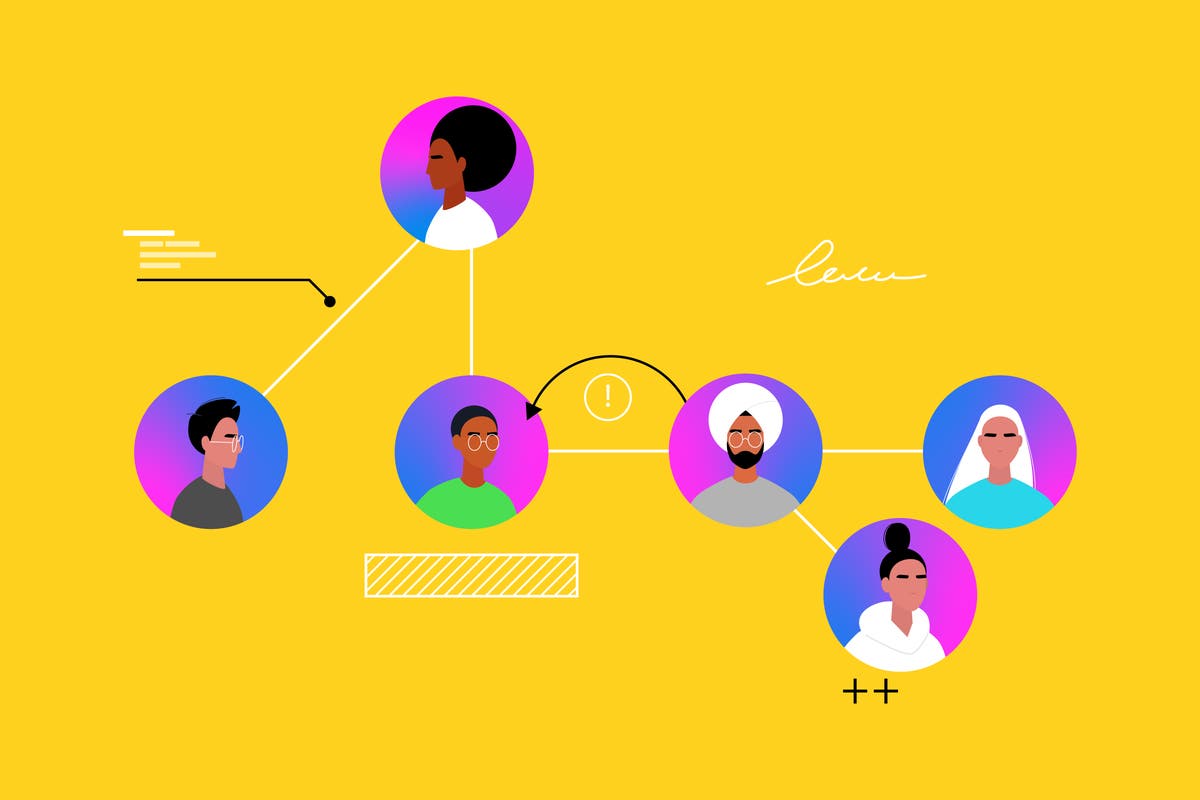
Sometimes a simple flow chart or diagram of the org can help you understand and visualize the team you're building for, the workflows they use, and who they work with cross-functionally.有時一張簡單的流程圖或組織圖可以幫助你理解和視覺化你所服務的團隊、他們使用的工作流程,以及跨功能協作的對象。
This will influence Teamspace and Page access which we'll discuss more in the Permissions lesson.這將影響 Teamspace 和 Page 的存取權限,我們會在權限設計課程中詳細討論。
3) How Existing Usage Informs Design3) 現有使用狀況如何影響設計
Understanding who is actually using the workspace (and how) shows which structures are working and where fragmentation exists; it prevents redesigns that ignore real usage patterns.了解誰在實際使用 Workspace(以及如何使用)能顯示哪些結構有效、哪裡存在碎片化;這能避免忽略真實使用模式的重新設計。
Question Examples:問題範例:
- How is Notion currently being used within your team?你的團隊目前如何使用 Notion?
- How do new team members learn where to go on day one?新成員在第一天如何知道該去哪裡?
Surfacing friction (duplication, findability issues, permission confusion) pinpoints architectural or information design gaps so you solve root causes instead of layering on cosmetic fixes.浮現摩擦點(重複、可尋性問題、權限混淆)能精確定位架構或資訊設計的缺口,讓你解決根本原因而非只做表面修補。
Question Examples:問題範例:
- What's the most frustrating task you tried to do in the workspace this week?本週在 Workspace 中最讓你沮喪的任務是什麼?
- Where do you see duplicate or conflicting versions of the same info?你在哪裡看到重複或衝突版本的相同資訊?
Identifying high-leverage improvements (consolidating databases, clarifying navigation, standardizing properties) directs architecture and design effort toward changes that unlock measurable efficiency and adoption gains.找出高槓桿的改善方向(整合 Database、釐清導航、標準化屬性)將架構和設計精力導向能帶來可量化效率和採用提升的改變。
Question Examples:問題範例:
- If we improved one thing that would immediately save time across teams, what is it?如果我們改善一件事就能立即為所有團隊節省時間,那會是什麼?
- Which duplicated databases could we consolidate without losing needed views?哪些重複的 Database 可以在不失去所需 View 的情況下合併?
Defining clear targets (adoption %, time-to-find, reduction in duplicate databases) aligns architecture and design decisions with business outcomes and provides a feedback loop to validate the new structure.定義清晰的目標(採用率 %、查找時間、重複 Database 減少量)將架構和設計決策與業務成果對齊,並提供驗證新結構的回饋迴路。
Question Examples:問題範例:
- How will you recognize improvement — what changes in behavior or numbers?你如何辨識改善——行為或數據上有什麼變化?
- What adoption percentage (weekly active users) would feel like 'healthy' in 90 days?在 90 天內,什麼樣的採用率(每週活躍使用者)會讓你覺得「健康」?
4) How Key Use Cases Impact Design4) 關鍵使用案例如何影響設計
Launching Notion with a few initial use cases (as identified by you and your customer in discovery) encourages healthy Notion adoption.用幾個初始使用案例(你和客戶在需求探索確定的)來啟動 Notion,能促進健康的 Notion 採用。
Defines Structure & Layout定義結構與佈局
Ensures the workspace is built around real workflows and team needs確保 Workspace 圍繞真實工作流程和團隊需求建置
Optimises Databases & Relations最佳化 Database 與 Relation
Aligns database design with core use cases for efficiency and scalability使 Database 設計與核心使用案例對齊,提升效率和可擴展性
Improves User Experience改善使用者體驗
Creates an intuitive and easy-to-navigate workspace tailored to how teams work打造直覺且易於導航的 Workspace,貼合團隊的工作方式
Drives Adoption & Engagement推動採用與投入
A well-designed workspace makes Notion more valuable and encourages consistent use設計良好的 Workspace 讓 Notion 更有價值,鼓勵持續使用
How Information is Structured in NotionNotion 中的資訊結構
Workspaces, Teamspaces, Pages, and Databases determine how users at a company will organize, interact with, and adopt content and workflows built with Notion. These structures (along with permissions) are the core areas you can use to build and design in Notion.Workspace、Teamspace、Page 和 Database 決定了公司使用者如何組織、互動和採用在 Notion 中建置的內容和工作流程。這些結構(連同權限)是你在 Notion 中建置和設計的核心領域。
What to know about Workspaces關於 Workspace 你需要知道的
Some companies may use multiple workspaces for deliberate use cases like legal separation or information barriers with strict IP.有些公司可能因為法律隔離或嚴格的智慧財產權資訊屏障等特定用途而使用多個 Workspace。
However Notion's recommended path is a single workspace by default to reduce information sprawl and silos.然而 Notion 建議的做法是預設使用單一 Workspace,以減少資訊擴散和孤島。
Questions to Ask:需要詢問的問題:

- Is there a legal, compliance, or residency reason that truly requires isolation?是否有法律、合規或資料駐留的原因真正需要隔離?
- Will any teams need to search, link, or relate data across workspaces?是否有團隊需要跨 Workspace 搜尋、連結或關聯資料?
- Do you want centralized governance and "one way of working"?你是否想要集中化治理和「統一的工作方式」?
If your customer answers yes to the above, you may need to create separate workspaces. In all other instances we recommend having one Workspace and building and customizing Teamspaces to meet customer needs.如果客戶對以上問題回答是,你可能需要建立獨立的 Workspace。在所有其他情況下,我們建議使用一個 Workspace 並建置和自訂 Teamspace 來滿足客戶需求。
What to know about Teamspaces關於 Teamspace 你需要知道的
A Notion Workspace should be designed so that end users can find 95% of what they need within 3 main Teamspaces.Notion Workspace 的設計應該讓終端使用者能在 3 個主要 Teamspace 中找到 95% 的所需。
Once you've aligned on what those Teamspaces are and who should have access, you can begin to create pages and workflows within them.一旦你們對齊了 Teamspace 的內容和誰應該有存取權限,就可以開始在其中建立頁面和工作流程。
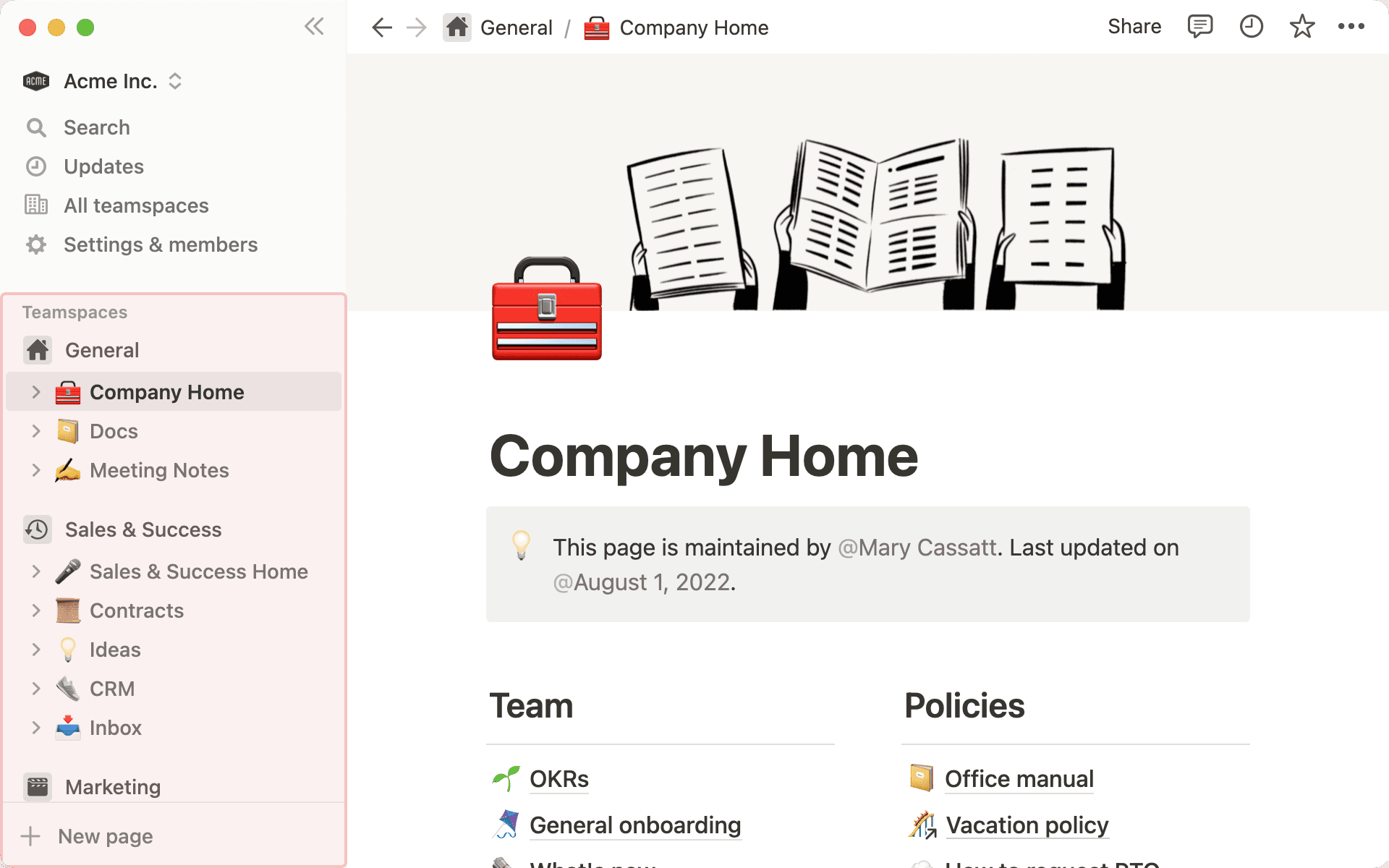
Example Notion Teamspace.Notion Teamspace 範例。
The 3 main Teamspaces we recommend starting with are:我們建議從以下 3 個主要 Teamspace 開始:
"Home" Teamspace「首頁」Teamspace
Where central knowledge for the whole company is located全公司核心知識的集中地
"Operating System" Teamspace「作業系統」Teamspace
Where cross functional knowledge and processes come together跨功能知識和流程的匯集處
"Functional/Team Area" Teamspace「功能/團隊區域」Teamspace
Where team priorities, workflows, and knowledge is located團隊優先事項、工作流程和知識的所在地
What to know about Pages關於 Page 你需要知道的
Once you've identified the Teamspaces you'll need, it's time to design the pages that sit within those Teamspaces.一旦確定了所需的 Teamspace,就該設計其中的頁面了。
Pages are where Notion "blocks" are located. Notion has hundreds of blocks for you to customize and build with to create valuable customer workflows and use cases to life.Page 是 Notion「區塊」所在之處。Notion 有數百種區塊供你自訂和建置,將有價值的客戶工作流程和使用案例化為現實。
Some example blocks include text, image, map, toggles, to-do lists, databases, and buttons.範例區塊包括文字、圖片、地圖、Toggle、待辦清單、Database 和按鈕。
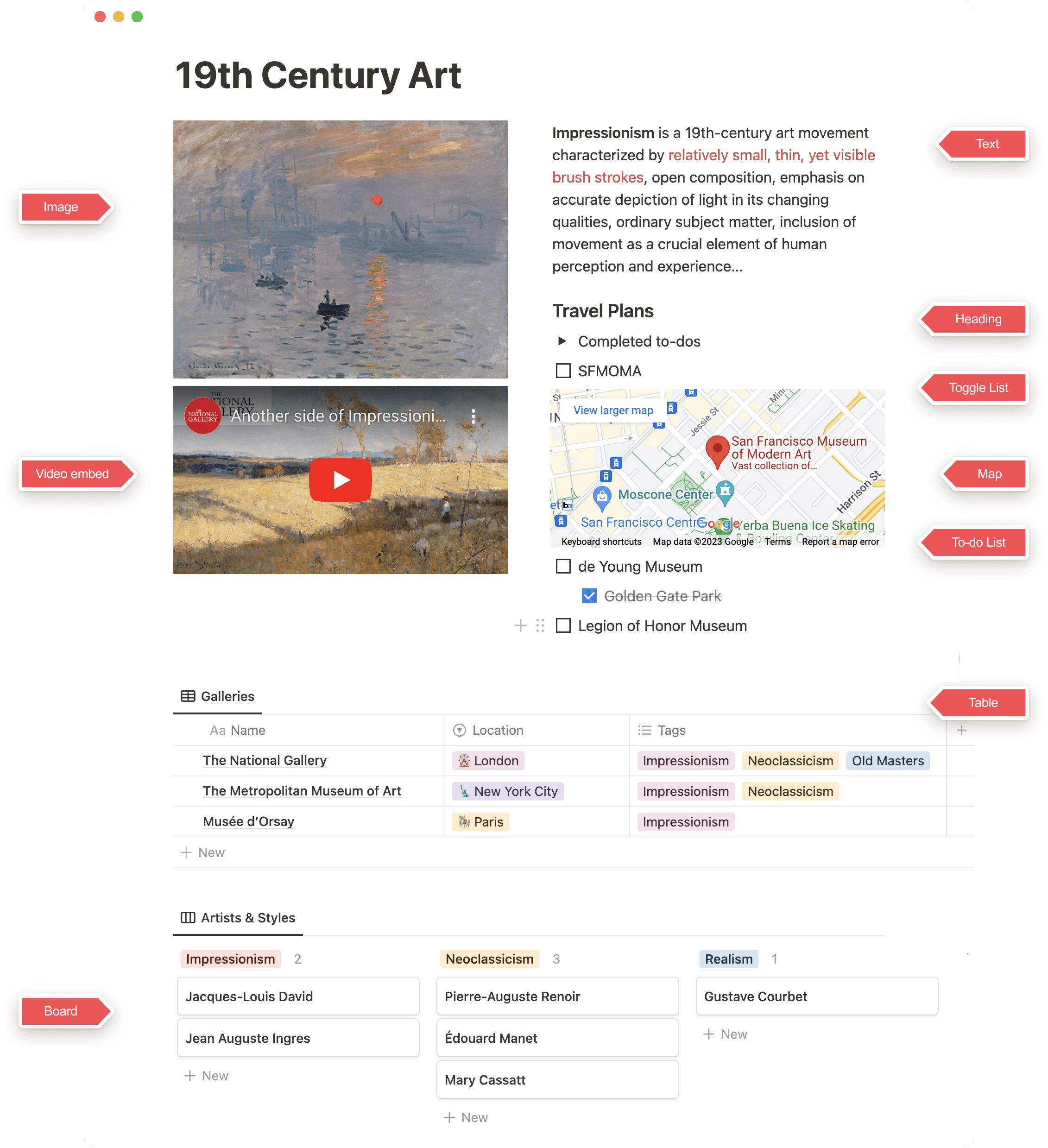
Page example showing the types of features that can be found on a page.Page 範例,展示可在頁面上找到的功能類型。
4. Permissioning4. 權限設計
Workspace permissions that shape your design and page-sharing capabilities.影響你的設計和頁面共享能力的 Workspace 權限。
Permissioning權限設計(Permissioning)
The three areas of permissioning you can adjust when building your workspace are:在建置 Workspace 時,你可以調整的四個權限區域是:
- Workspace AccessWorkspace 存取
- Teamspace AccessTeamspace 存取
- Group Access群組存取
- Database PermissionsDatabase 權限
You'll want to determine who needs access to what information, and where their access point is within the workspace. Is it through a default teamspace? Can they find the information through search or by using Notion AI? Can a page be shared with them directly, or can they access pages in a database?你需要決定誰需要存取什麼資訊,以及他們在 Workspace 中的存取點在哪裡。是透過預設的 Teamspace?能透過搜尋或 Notion AI 找到資訊嗎?能直接與他們共享頁面嗎?還是他們能存取 Database 中的頁面?
Set default teamspaces. Become a Teamspace owner and override permissions set at Workspace level.設定預設 Teamspace。成為 Teamspace 擁有者並覆蓋在 Workspace 層級設定的權限。
Workspace Owner or Org Owner (on Enterprise)Workspace Owner 或 Org Owner(Enterprise 方案)
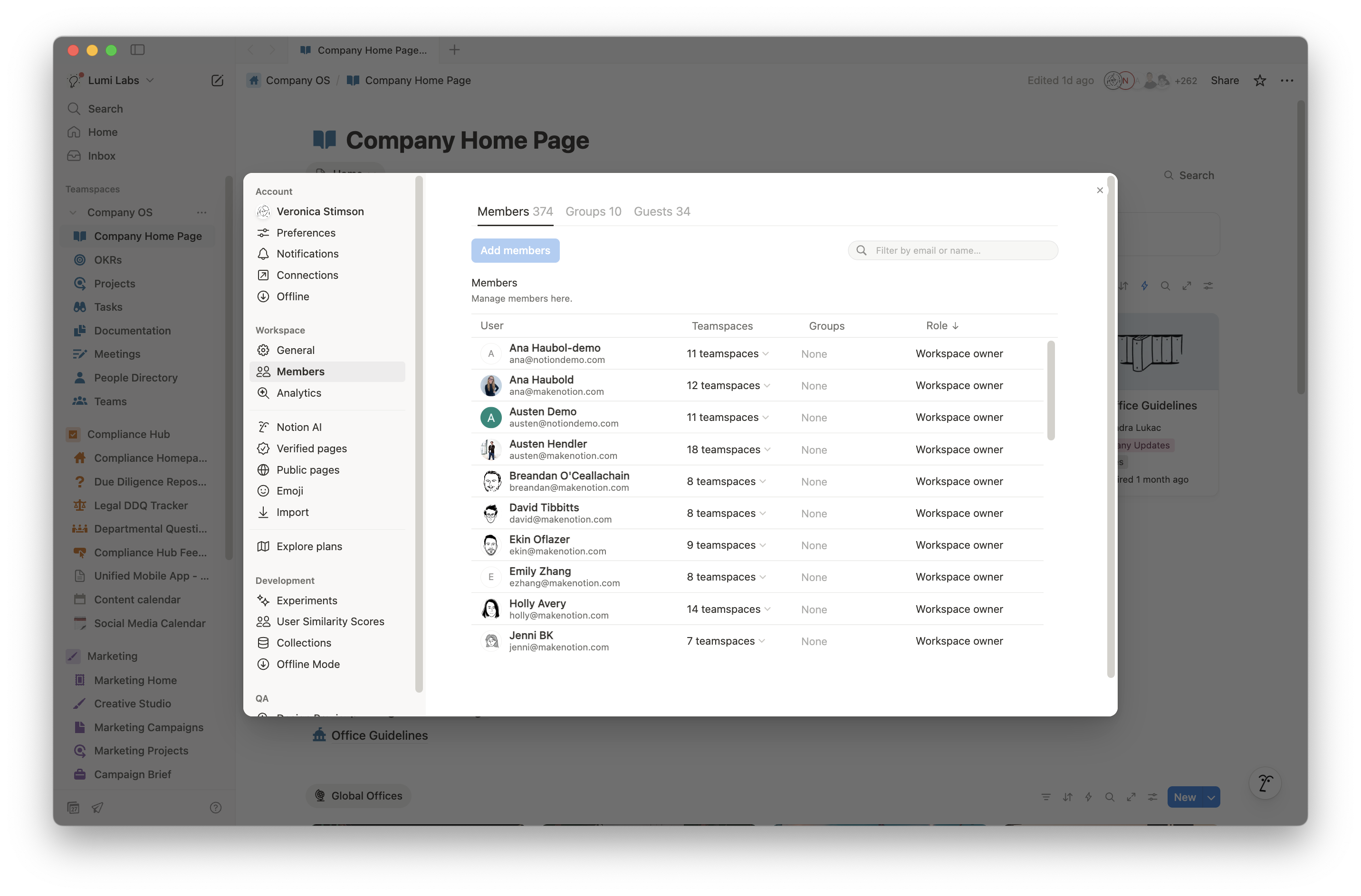
Example of Permissioning setting.權限設定範例。
Set your Teamspace discoverability. Add groups.設定 Teamspace 的可發現性。新增群組。
Teamspace Owner
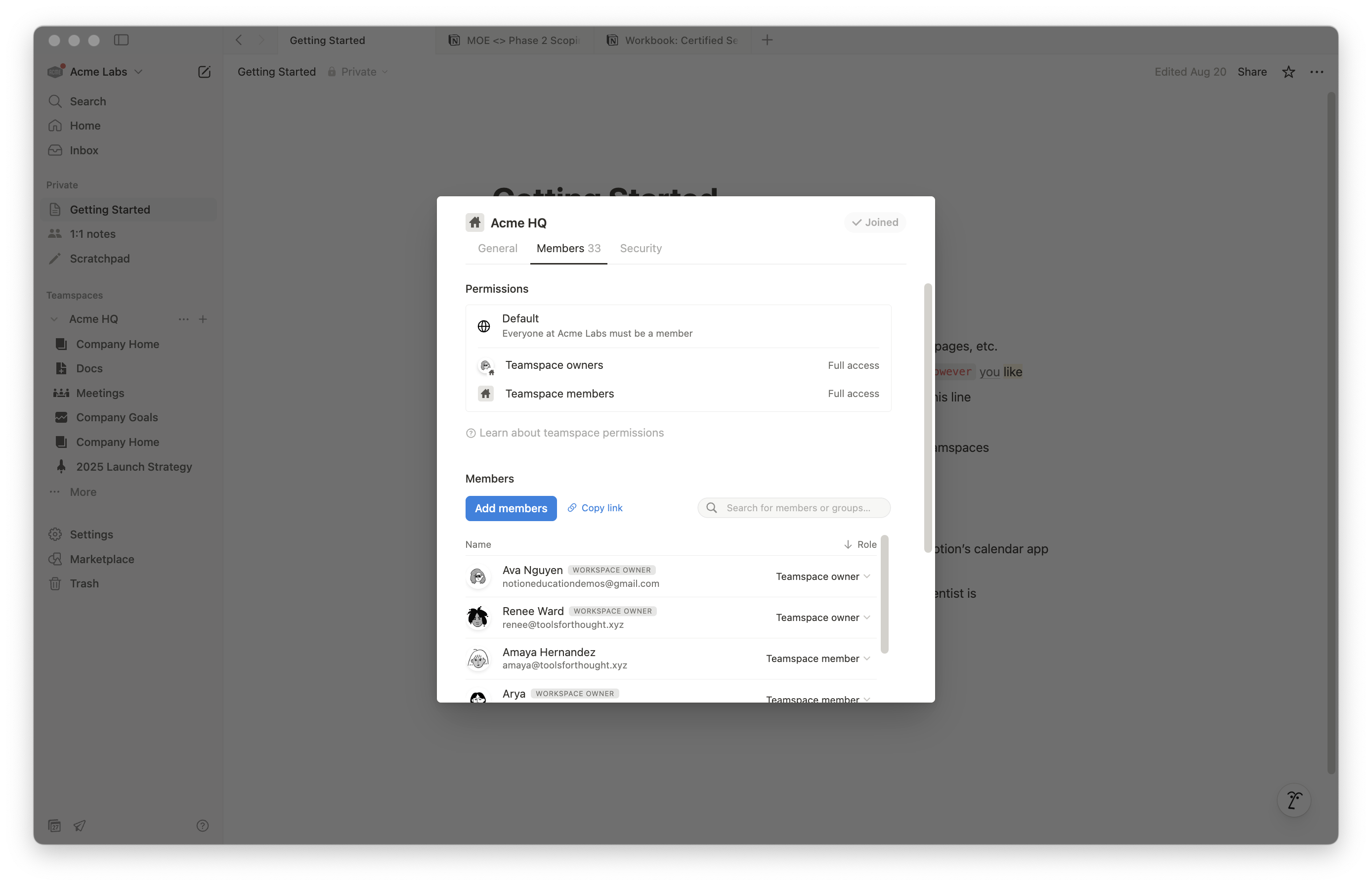
Example of team access settings.團隊存取設定範例。
Be added to Teamspaces. Be shared a page.被加入 Teamspace。被分享頁面。
Workspace Owners and Membership AdminsWorkspace Owner 和 Membership Admin
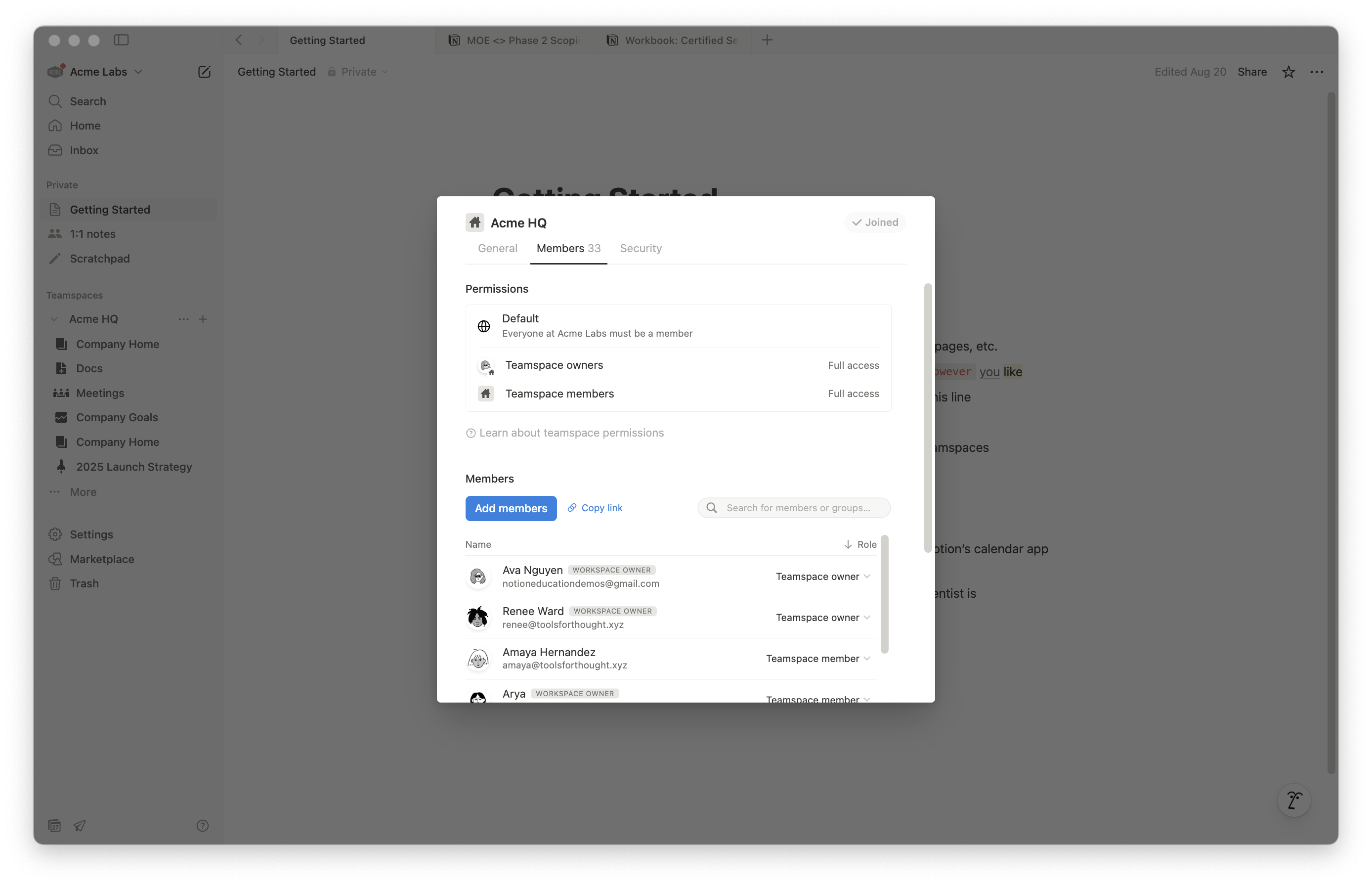
Example of group access settings.群組存取設定範例。
Can edit content (under the Share tab)可以編輯內容(在 Share 分頁下)
All Members (i.e., the person who created the database)所有成員(即建立 Database 的人)
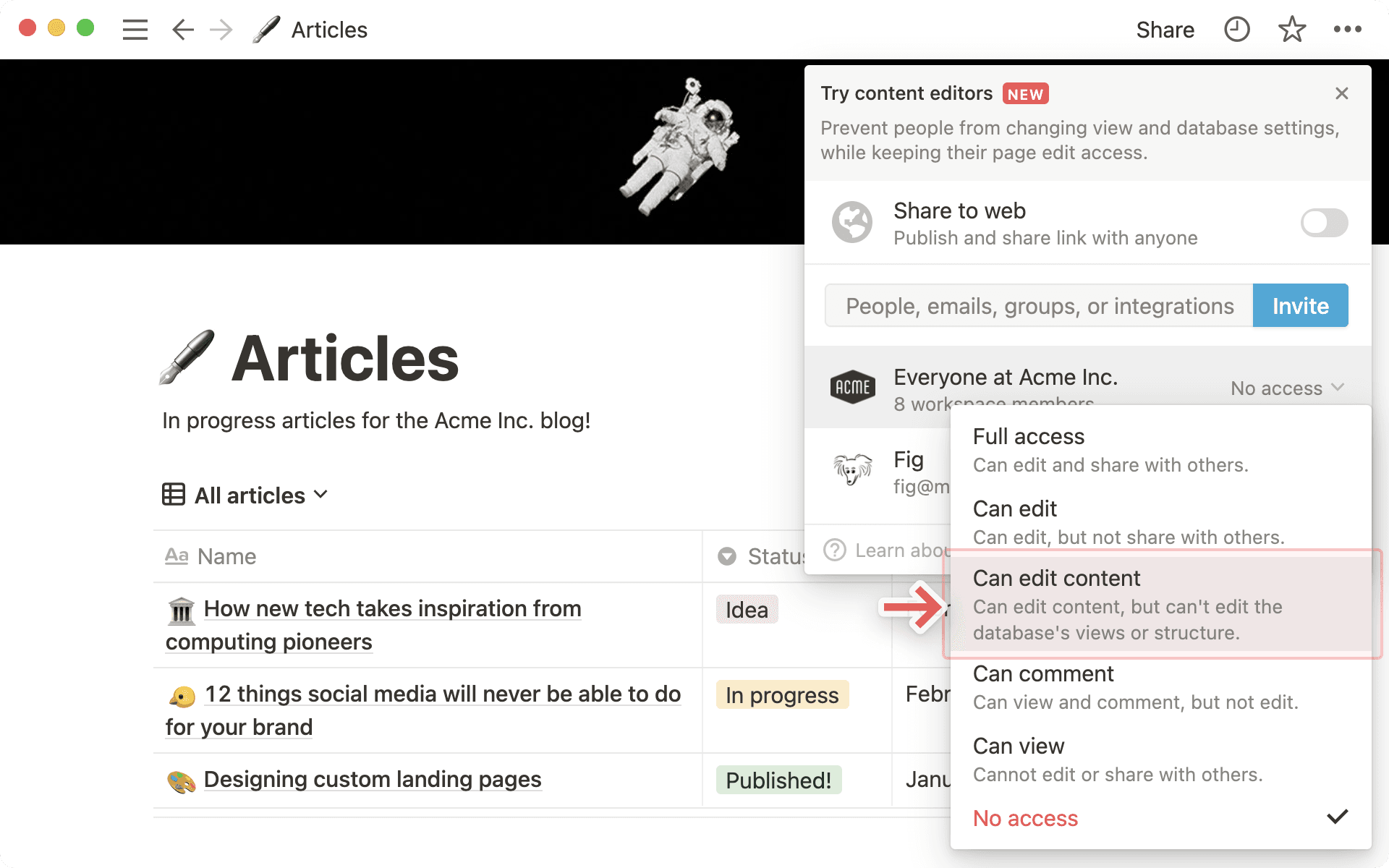
Example of database permission settings.Database 權限設定範例。
Page Sharing頁面共享
In short, does your workspace allow for public page sharing? To help your customer answer this question, here are three things to keep in mind regarding page sharing when designing workspaces:簡而言之,你的 Workspace 是否允許公開頁面共享?為幫助客戶回答這個問題,在設計 Workspace 時請記住以下關於頁面共享的三件事:
- Generally, the creator of a Notion page can determine its sharing settings通常,Notion Page 的建立者可以決定其共享設定
- However a Workspace Owner has the option to disable publishing sites, forms and public links, and disable duplicating pages to other workspaces if they so choose然而 Workspace Owner 可以選擇停用發佈網站、表單和公開連結,以及停用將頁面複製到其他 Workspace 的功能
- Pages inherit their parent Page settings, unless explicitly set otherwise by the creatorPage 會繼承其父頁面的設定,除非建立者明確設定不同的設定
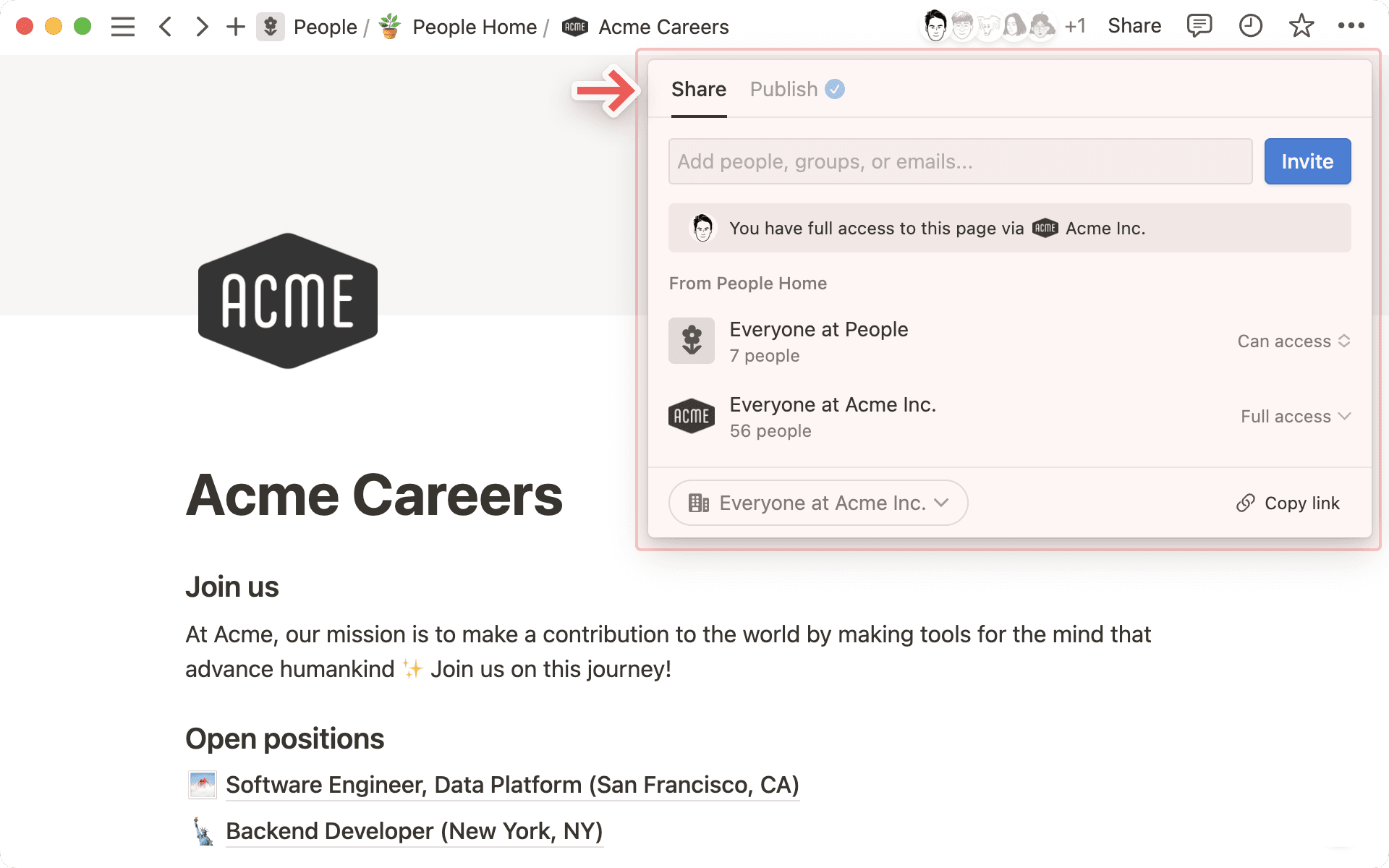
Page sharing access example.頁面共享存取範例。
Questions to Ask:需要詢問的問題:
- Is there a need for different types of content that require different sharing rules — for example, confidential documents that should never be shared externally versus collaborative documents that teams should freely share?是否有不同類型的內容需要不同的共享規則——例如永遠不應對外共享的機密文件,與團隊應自由共享的協作文件?
- Is there a need for centralized control over external sharing, or are you comfortable with individual page creators being able to publish pages publicly and share them outside the organization?是否需要對外部共享進行集中控制,還是你能接受個別頁面建立者能夠公開發佈頁面並分享到組織外部?
Depending on your customer's response you can determine what page sharing levels are appropriate for their needs.根據客戶的回應,你可以決定什麼樣的頁面共享層級適合他們的需求。
Best Practice for Managing Public Page Sharing管理公開頁面共享的最佳實務
Restrict Public Sharing by Default預設限制公開共享 (ENT Plan Only)(僅限 Enterprise 方案)
- Disable public sharing at the workspace level to prevent accidental exposure在 Workspace 層級停用公開共享以防止意外曝光
- Users may not realize that when they publish a page, all its sub-pages are also made public使用者可能沒有意識到,當他們發佈一個頁面時,所有子頁面也會被公開
- Disable publishing of sites/forms at the workspace level and enabling it only within specific team spaces when needed在 Workspace 層級停用網站/表單發佈,僅在需要時於特定 Teamspace 中啟用
- Admins can monitor and audit all publicly shared pages by navigating to the Sites tab管理員可以透過導航到 Sites 分頁來監控和稽核所有公開共享的頁面
Audit Shared Pages Regularly定期稽核共享頁面 (ENT Plan Only)(僅限 Enterprise 方案)
- Use audit logs to track publicly shared pages and periodically review access使用稽核日誌追蹤公開共享的頁面,定期檢視存取狀況
Enforce Access Controls強制存取控制
- Require admin approval for public sharing using a custom workflow使用自訂工作流程要求管理員批准公開共享
- Restrict public sharing to admins only將公開共享限制為僅管理員可執行
- Implement a request-based system where users must obtain admin approval before enabling "Share to web" on specific pages實施基於申請的系統,使用者必須在啟用特定頁面的「Share to web」之前獲得管理員批准
Educate Users教育使用者
- Train teams on security risks associated with public sharing培訓團隊了解與公開共享相關的安全風險
- Promote private sharing alternatives to enhance data security推廣私密共享的替代方案以增強資料安全
5. Building Use Cases5. 建置使用案例
Learn how to Discover, Design, Validate, Deploy, and Evolve use cases for real-world impact.學習如何探索、設計、驗證、部署和演進使用案例,實現真實商業影響。
Effective use case design ensures Notion is tailored to real business needs, making it immediately valuable and relevant for users. By focusing on high-impact workflows, teams can quickly see Notion's benefits, reducing resistance and accelerating adoption.有效的使用案例設計確保 Notion 針對真實業務需求量身打造,使其立即對使用者有價值且相關。透過聚焦高影響力的工作流程,團隊能快速看到 Notion 的好處,降低抗拒並加速採用。
1) Discover1) 探索
Before you build, listen! Use customer discovery to reveal the workflows with the biggest payoff.在建置之前,先傾聽!透過客戶探索揭示回報最大的工作流程。
- Identify key workflows, pain points, and goals to ensure Notion is designed for real business needs識別關鍵工作流程、痛點和目標,確保 Notion 針對真實業務需求設計
- Discovery of use cases can take place during pre-sales discussions or as part of the kick-off phase to align expectations early使用案例的探索可以在售前討論中進行,或作為啟動階段的一部分以提前達成共識
- Interviews with key SMEs, user groups, and discovery workshops are valuable for gathering insights and ensuring use cases are aligned with real user and business needs與關鍵 SME、使用者群組的訪談以及探索工作坊對於收集洞察、確保使用案例與真實使用者和業務需求對齊非常有價值
Sample Discovery Questions探索問題範例
- What are your team's biggest workflow challenges?你的團隊最大的工作流程挑戰是什麼?
- What tools do you currently use, and where are the gaps?你們目前使用哪些工具?差距在哪裡?
- What business processes are core to you delivering on your OKRs?哪些業務流程是你達成 OKR 的核心?
- What are some of the core business processes that are causing bottlenecks?哪些核心業務流程正在造成瓶頸?
- What does success with Notion look like for your team?對你的團隊而言,Notion 使用成功的樣子是什麼?
2) Design2) 設計
You've gathered the facts. Now let's pick the highest-value process and turn it into a simple, scalable build in Notion.你已經收集了事實。現在讓我們選擇最高價值的流程,將其轉化為 Notion 中簡單、可擴展的建置。
High Level Use Cases Examples:高層級使用案例範例:
- Knowledge Management知識管理(Knowledge Management)
- Project Management專案管理(Project Management)
- Content and Marketing Calendar Management內容與行銷日曆管理
- OKRs & Goal TrackingOKR 與目標追蹤
- Onboarding & Training入職與培訓(Onboarding & Training)
3) Deliver3) 交付
Now it's time to deliver. This phase brings together validate, deploy, and evolve. Let's dive in.現在是交付的時候了。這個階段整合了驗證、部署和演進。讓我們深入了解。
- Create an initial version in Notion (ideally in a sandbox) and test functionality在 Notion 中建立初始版本(最好在沙盒中)並測試功能
- Pilot with key stakeholders與關鍵利害關係人進行試行
- Gather feedback, adjust layouts, and optimize for usability收集回饋、調整佈局,並針對可用性進行最佳化
- Build a comms & enablement plan to drive awareness and adoption of key use cases. This can be woven into overall Notion launch plan if it coincides建立溝通與賦能計畫,推動關鍵使用案例的認知和採用。如果時間吻合,可以融入整體 Notion 啟動計畫中
- Roll-out use case & measure adoption推出使用案例並衡量採用率
- Continuously refine based on usage insights and evolving needs根據使用洞察和不斷變化的需求持續改進
- Optimize and scale as needed with Notion根據需要在 Notion 中最佳化和擴展
6. Exercise: Building a Key Use Case6. 實作練習:建置核心使用案例
Put concepts into practice by building a core use case for Milestone Mint.透過為 Milestone Mint 建置核心使用案例來將概念付諸實踐。
This is a mandatory step in earning your Services Certification.這是取得服務認證的必修步驟。
Now it's your turn! Below, we've provided an example use case from Milestone Mint for one of 3 main Teamspaces we introduced earlier, the Home area. For this exercise we encourage you to use what you've learned throughout the Notion Academy & Certification courses you've taken so far.現在輪到你了!下方我們為之前介紹的 3 個主要 Teamspace 之一——首頁區域——提供了一個 Milestone Mint 的使用案例範例。在這個練習中,我們鼓勵你運用在 Notion Academy 和認證課程中學到的知識。
The use case for this exercise includes:本練習的使用案例包含:
- ⚠️ Customer Pain Point — What is the problem this key use case is solving for?⚠️ 客戶痛點——這個核心使用案例要解決什麼問題?
- ✨ Use Case — A description of the workflow built in order to solve for the customer pain point✨ 使用案例——為解決客戶痛點而建置的工作流程描述
- 📊 Impact Examples — The success metrics used to show impact, or customer value📊 影響範例——用以展示影響力或客戶價值的成功指標
Read through the example below and familiarize yourself with the details. When ready, duplicate the provided template, recreate the build yourself, and submit your design! And remember: no two builds will be the same. Feel free to customize and add your personality to what you make. But keep in mind the 3 workspace design principles as your north star: transparency, simplicity, and governance.閱讀下方的範例並熟悉細節。準備好後,複製提供的 Template,自己重建這個方案並提交你的設計!記住:沒有兩個建置會完全相同。歡迎自訂並加入你的個人風格。但請將 3 個 Workspace 設計原則作為你的北極星:透明性、簡潔性和治理。
⚠️ Customer Pain Point⚠️ 客戶痛點
As we know, Milestone Mint struggles with information fragmentation across multiple systems. This often leads to:如我們所知,Milestone Mint 面臨多個系統之間的資訊碎片化問題。這通常導致:
- Employees spending 20% of their time searching for information across disconnected tools*員工花費 20% 的時間在斷開連接的工具之間搜尋資訊*
- Inconsistent communication of company vision and values公司願景和價值觀的溝通不一致
- Leadership and HR lack a central channel to share and maintain company policies and internal knowledge and documentation管理層和人資缺乏集中的管道來分享和維護公司政策與內部知識文件
*data from customer engagement survey*資料來自客戶參與度調查
✨ Use Case✨ 使用案例
Milestone Mint has asked that Notion serve as the organization's single source of truth, featuring:Milestone Mint 希望 Notion 成為組織的單一事實來源,包含:
- Company Intranet/Wiki: Dedicated space for company policies and internal knowledge sharing公司內部網站/Wiki:公司政策和內部知識分享的專屬空間
- Self-Service Portal: Employees can instantly find answers to common questions without creating tickets自助服務入口:員工可以即時找到常見問題的答案,無需建立工單
- Onboarding Hub: New hire resources, company culture materials, and role-specific information in one accessible location入職中心:新進人員資源、公司文化素材和職位特定資訊集中在一個易於存取的位置
📊 Success Metrics Examples📊 成功指標範例
- Reduced time for employees to find and self-serve across internal company knowledge減少員工在內部公司知識中查找和自助服務的時間
- Reduction in time HR spend answering questions on policies and benefits減少人資回答政策和福利問題所花的時間
- Improved alignment across organizational policies and processes改善組織政策和流程的一致性
- Increased visibility between leadership and organization提升管理層與組織之間的可見度
Now it's your turn!現在輪到你了!
Build a Company Home Page建置公司首頁
Click "Download content" to begin customizing Milestone Mint's Company Home Page and incorporate their objectives from above. Use what you've learned from the Notion Academy & Certifications courses to help you build.點擊「下載內容」開始自訂 Milestone Mint 的公司首頁,並融入上述目標。運用你在 Notion Academy 和認證課程中學到的知識來幫助你建置。
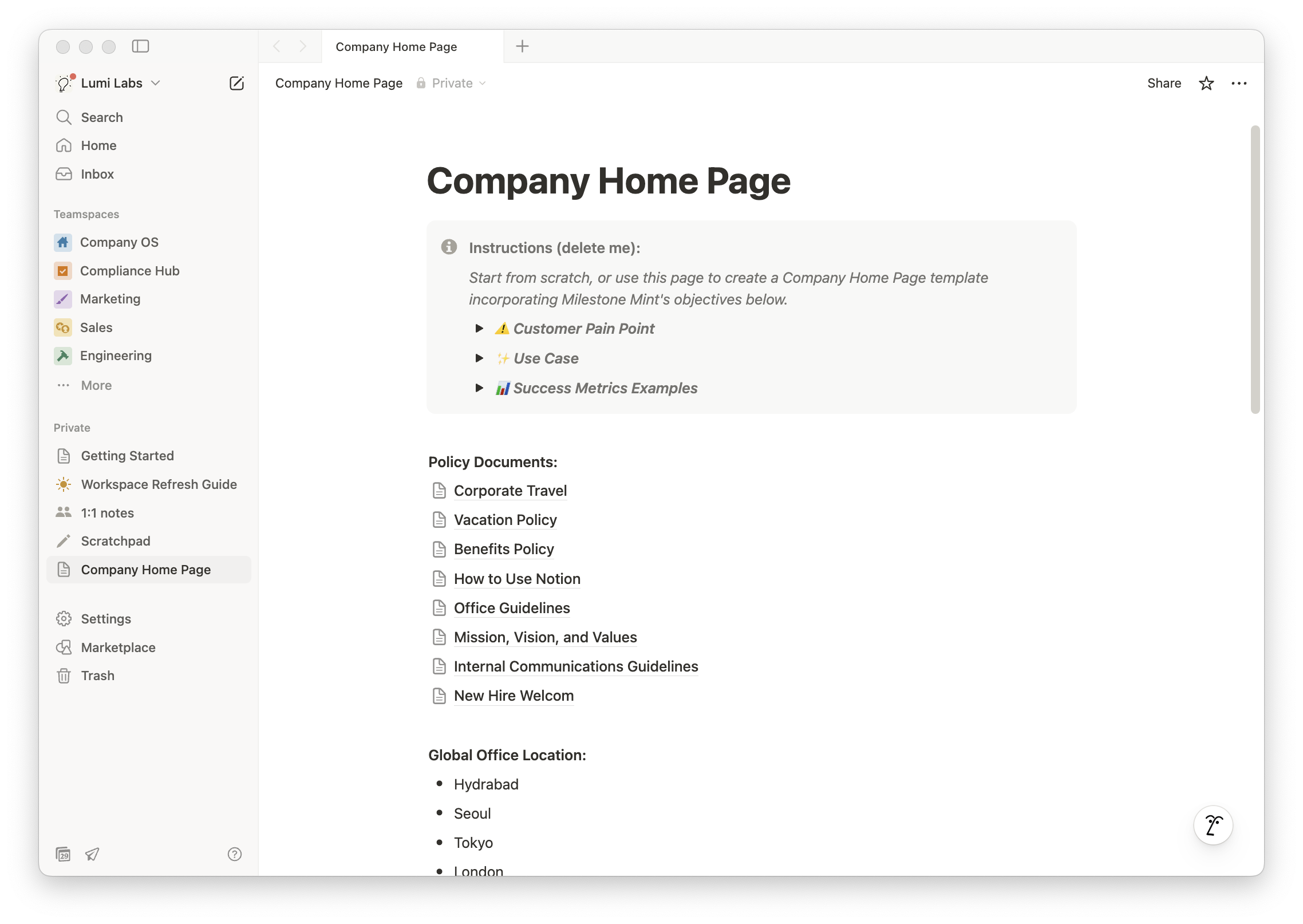
Required - Submit your build必須提交你的建置作品
Once ready, submit a link to your build and describe how you'll measure success!準備好後,提交你的建置連結並描述你將如何衡量成功!
Remember to adjust the page sharing settings so we can review your submission. Click Share > Publish > Publish. This is a mandatory activity. If left blank, we reserve the right to revoke your certification.請記得調整頁面共享設定以便我們審核你的提交。點擊 Share > Publish > Publish。這是必修活動。如果留空,我們保留撤銷你認證的權利。